AI 代理的感官扩展与本地效率工具:今日开源项目观察
日报 · 2026-10-16 · GitHub 新星
覆盖日期:2026-10-16 · 北京时间
发布时间:2026/10/17 08:00:24
修订于 2026/10/17 23:31:02 · 原刊收录 21 个项目,修订版采用 20 个仍可公开项目。本版不作跨期比较。
本刊有 1 个项目已不可公开,相关条目已隐藏。
本期日报聚焦 AI 代理的感知与自动化能力,涵盖音频分析、逆向工程、记忆管理、3D 建模辅助及文件转换等方向。项目各有侧重,适合开发者、艺术家及效率追求者探索。
修订版说明:原刊收录 21 个项目,本版依据 20 个仍可公开项目。对比资料不再完整,本版不作跨期比较。原刊物快照和历史文章保留。
今天的开源项目呈现出一种有趣的趋势:AI 代理不再局限于文本和代码,开始拥有“耳朵”和“眼睛”,能够感知音频、理解场景,甚至参与复杂的 3D 创作。同时,一批专注于本地化、隐私保护和效率提升的工具也在涌现,为日常工作和生活带来切实的便利。以下是我们从本期收录项目中挑选的几个代表性方向。
1. AI 代理的感官扩展:从“听”到“看”
1.1 让代理听见声音:earshot
AI 编码代理能写出渲染视频或游戏的代码,却无法“听见”自己创作的声音。earshot 正是为了解决这一痛点而生,它是一款纯 CPU 运行的本地音频分析工具,为代理提供“耳朵”。通过 CLI、Python API 或 MCP 服务器,代理可以描述音频文件、匹配声音描述、在长录音中查找特定片段,甚至生成整个影片的逐秒收听记录。更特别的是,earshot 还包含一个 forge 模块,允许代理用代码合成声音,并通过内置的“评论家”模型不断迭代改进,直到声音听起来真实自然。项目作者也坦诚地指出了限制:模型无法判断品味、情感、来源或许可证,也无法处理语音内容,且无法分析 14kHz 以上的频率。对于需要为游戏或演示添加音效的开发者来说,这是一个值得尝试的工具。
1.2 让代理看懂 Blender:mcp-for-blender-pro
如果说 earshot 是代理的耳朵,那么 mcp-for-blender-pro 就是代理在 3D 世界中的眼睛和手。这个插件为 Blender 带来了 AI 助手和 MCP 服务器,支持可视化聊天、场景检查、对象创建、材质编辑和资产查找。它最吸引人的地方在于多代理工作流:你可以配置一个“经理”代理来分解任务,多个“工人”代理执行场景操作,再由“审查员”代理检查结果,形成一个有序的自动化团队。项目支持 OpenAI、Claude、Gemini 等主流模型,也支持本地 Ollama,并提供了 21 个场景工具。需要注意的是,当前版本仅支持 Windows x64 和 Blender 4.2+,且 Python 工具验证并非安全沙箱,外部客户端需自行管理审批策略。对于希望加速迭代的艺术家和技术美术来说,这个插件提供了新的可能性。
2. 逆向工程与记忆管理:深入理解与长期陪伴
2.1 逆向一切:REA
REA 是一个通过 MCP 服务连接智能体的逆向分析工具,旨在帮助开发者理解没有源代码的应用功能。它支持分析原生二进制、JavaScript/Electron 应用、.NET 程序集和网站,并能在本机运行,结果包含证据和限制。设置流程支持 Claude Code、Codex、Cursor 等主流智能体,原生分析需要 Hopper、Ghidra 或 IDA 等引擎,而静态 JavaScript 分析则无需额外工具。项目明确声明仅用于合法的逆向工程研究,用户需自行确保授权。对于想要学习优秀应用实现原理的开发者,REA 提供了一个结构化的途径。
2.2 为代理构建长期记忆:Hy-Memory
腾讯混元开源的 Hy-Memory 是一个生产级的双系统认知记忆引擎,为 LLM 代理提供聊天、工作和编码三种场景的记忆管道。它支持分层长期记忆、事实与经验记忆,以及代码版本演化链。通过 Python SDK,开发者可以轻松集成,只需配置 LLM 和嵌入端点即可。项目还提供了 MemHub 桌面端,用于统一管理来自 Claude Code、Cursor 等应用的对话和编码记录。值得注意的是,工作与编码记忆的写入必须包含工具调用轨迹,且仅在 pro 或 ultra 模式下生效。对于构建需要长期记忆的复杂代理应用,Hy-Memory 提供了一个坚实的基座。
3. 效率工具:本地转换与智能点餐
3.1 本地文件转换:Filee
Filee 是一款免费开源的本地文件转换工具,支持超过 180 种格式,涵盖图片、PDF、Office 文档、视频、音频等。它的交互方式很特别:按住 Ctrl 键拖拽文件,光标处会弹出格式圆环,直接拖放到目标格式即可完成转换,全程无需上传,保护隐私。项目支持批量转换、自动多步路由(如 HWP → HWPX → DOCX),甚至能监控文件夹自动处理新文件。目前 Windows 10/11 可直接安装,macOS 和 Linux 为预览版,部分格式需要额外下载引擎。对于经常处理各种文件格式的用户,Filee 是一个高效且安全的本地解决方案。
3.2 麦当劳省钱精算师:mcd-saver-strategist
这个项目将组合优化算法应用到了日常点餐中。作为 WorkBuddy 的 Skill,它通过麦当劳中国 MCP 拉取菜单和优惠券,用确定性算法计算最优组合,帮助用户省钱。例如,巨无霸套餐直选 47 元,通过“1+1 随心配”组合后仅需 21.9 元,节省 53%。项目支持预算和热量硬约束,适合学生、上班族和减脂人群。需要注意的是,菜单价格和优惠券内容为示例快照,实际以门店实时返回为准,且部分门店券仅到店可用。对于喜欢精打细算的用户,这是一个有趣的尝试。
4. 其他值得关注的项目
本期还有一些项目值得留意:
- Timestral:Mistral AI 开源的时间序列基础模型家族,支持多变量概率预测,CPU 即可运行,适合零样本预测场景。
- GoogleUnlimited:通过模拟 Pixel 设备实现 Google Photos 无限原画质备份,支持多平台,但需要手动获取 oauth_token,且存在账号风险。
- iss_pc:将 PS4 游戏《声名狼藉:次子》移植到 PC 的原生项目,目前可玩但性能不稳定,适合技术爱好者尝鲜。
- Autoloom:面向 AI 编码代理的治理工程客户端,将 Aegis 方法集成到编码运行时,强调变更依据和证据保留,目前为 Windows Beta 版。
5. 结语
今天的项目展示了 AI 代理能力的多元化拓展,从感知音频、操作 3D 软件,到逆向分析、长期记忆管理,AI 正在逐步融入更复杂的创作和开发流程。同时,本地化、隐私保护和效率优化的工具也在持续涌现,为用户提供了更多选择。无论你是开发者、艺术家还是普通用户,都能从中找到值得一试的项目。
项目链接:
- KnifeLemon/Filee
- blixvip/NullMotion
- GanyuanRan/Autoloom
- hujjun/mcd-saver-strategist
- HayatoG/iss_pc
- bbylw/rea-cn
- Tencent-Hunyuan/Hy-Memory
- carreypro/ict-trading-model
- Leonxlnx/earshot
- mistralai/timestral
- anujasid/mcp-for-blender-pro
- shishir0x/GoogleUnlimited
项目地址(KnifeLemon/Filee):https://github.com/KnifeLemon/Filee
项目地址(blixvip/NullMotion):https://github.com/blixvip/NullMotion
项目地址(GanyuanRan/Autoloom):https://github.com/GanyuanRan/Autoloom
项目地址(hujjun/mcd-saver-strategist):https://github.com/hujjun/mcd-saver-strategist
项目地址(HayatoG/iss_pc):https://github.com/HayatoG/iss_pc
项目地址(bbylw/rea-cn):https://github.com/bbylw/rea-cn
项目地址(Tencent-Hunyuan/Hy-Memory):https://github.com/Tencent-Hunyuan/Hy-Memory
项目地址(carreypro/ict-trading-model):https://github.com/carreypro/ict-trading-model
项目地址(Leonxlnx/earshot):https://github.com/Leonxlnx/earshot
项目地址(mistralai/timestral):https://github.com/mistralai/timestral
项目地址(anujasid/mcp-for-blender-pro):https://github.com/anujasid/mcp-for-blender-pro
项目地址(shishir0x/GoogleUnlimited):https://github.com/shishir0x/GoogleUnlimited
文章生成于 2026/10/17 23:31:02 · 依据本期保存的资料撰写
本期项目与来源资料
收录数按本期首次达标收录的项目统计。
- KnifeLemon/FileeC# · 1,248 Stars
文件格式转换
Stars 统计更新于 2026/10/17 07:45:19
查看原始资料
作者描述
Free, open-source file converter. Convert 180+ formats offline by drag & drop — images, PDF, Word, Excel, PowerPoint, HWP/HWPX, video, audio, e-books and archives. No upload, no Office needed.
编报时的 AI 中文解读
Filee 是一款免费开源的本地文件格式转换工具,支持通过拖拽方式离线转换超过180种格式,涵盖图片、PDF、Office文档、视频、音频、电子书和压缩包等,无需上传文件或安装Office等额外软件。
编报时的 README 依据
<p align="center"> <a href="https://filee.sh"><img src="docs/media/banner-en.jpg" alt="Filee: Drag. Drop. Converted." width="100%"></a> </p> <p align="center"> <b>A free, open-source file converter you use by dragging.</b><br> Hold a key (<kbd>Ctrl</kbd>, <kbd>Option</kbd> on macOS), drag files and drop them on a format in the donut that opens at your cursor. </p> <p align="center"> <a href="https://filee.sh"><b>Website</b></a> · <a href="https://github.com/KnifeLemon/Filee/releases/latest"><b>Download</b></a> · <a href="#install">Install</a> ·
## Features - **A donut at the cursor**: hold a key, drag files and drop them on a format. Only formats that fit the files appear. - **One toolbar per file type**, arranged by drag and drop, with presets for quality, size, DPI, PDF pages, video and audio, output folder and file names. - **Many files at once**, in parallel. Routes with several steps (HWP → HWPX → DOCX) are found automatically. - **Watch folders** convert every file that lands in them. - **Other ways in**: the right-click menu, a keyboard shortcut, the drop zone and the [`filee` command](#command-line).
<a href="https://github.com/KnifeLemon/Filee/releases"><img src="https://img.shields.io/github/downloads/KnifeLemon/Filee/total?color=1D9E75" alt="Downloads"></a> <img src="https://img.shields.io/badge/Windows-10%20%7C%2011-3C3489" alt="Windows 10 | 11"> <img src="https://img.shields.io/badge/macOS%20%7C%20Linux-preview-534AB7" alt="macOS | Linux preview"> <a href="LICENSE"><img src="https://img.shields.io/badge/license-MIT-6A62C9" alt="MIT license"></a> </p> <p align="center"><b>English</b> · <a href="README.ko.md">한국어</a> · <a href="README.zh-CN.md">简体中文</a></p> <table> <tr>
Setup can add the Explorer menu, start at sign-in, the `filee` command and optional engines. - **macOS 14+** (preview): unpack the `osx-arm64` or `osx-x64` package and run `./install.sh`. The build isn't notarized yet, so allow the first start in System Settings → Privacy & Security → **Open Anyway**. - **Linux x64/ARM64** (preview): unpack the package and run `./install.sh` (no root, needs Python 3). Drag gestures need X11. On Wayland, use the drop zone and the file manager's right-click menu. Filee shows new releases in its menu and updates itself, keeping your settings and engines.
Marked ones need an optional engine, downloaded only when needed: ¹ Ghostscript, ² LibreOffice, ³ Pandoc, ⁴ calibre, ⁵ FFmpeg ([details](docs/ENGINES.md)). ## Command line The `filee` command uses the same engines and presets as the app (Setup or `install.sh` adds it). ``` filee convert photo.heic --to jpg filee convert *.png --to webp --quality 80 -o converted filee watch D:\Inbox --to pdf --move-originals ``` Every command and option: [filee.sh/cli](https://filee.sh/cli/) or `filee help`. ## Development Build with the .NET 10 SDK on Windows, macOS or Linux: ```bash
- blixvip/NullMotionHTML · 1,002 Stars
动效拆解、视频导出
Stars 统计更新于 2026/10/17 07:50:45
查看原始资料
作者描述
Play a finished motion-graphics ad in sync with the rough drafts it grew from, and export the breakdown as MP4.
编报时的 AI 中文解读
本地运行的动效广告拆解预览工具,将成片与分镜草稿同步对照播放,并可导出为MP4视频,适合学习、提案或展示动效广告的构建过程。
编报时的 README 依据
git clone https://github.com/blixvip/NullMotion.git && cd NullMotion npm start # Node 22+, nothing to install ``` Then open **<http://127.0.0.1:4343>**, pick a reference, and press **Download → Whole preview** (Chrome or Edge) to get the MP4. No `npm install`, no API keys, no account. Three references ship with the repo, so it works on the first run.
4. **Export.** A hidden copy of the film plays at half speed. `requestVideoFrameCallback` captures every decoded frame, the drafts are drawn at that frame's exact time, and WebCodecs encodes it at 24 Mbps with the frame's own timestamp. The audio is copied from the reference, and [mp4-muxer](https://github.com/Vanilagy/mp4-muxer) writes the MP4. Nothing is recorded in real time, so no frames are dropped. ### Requirements | | Needed for | |---|---| | **Node.js 22+** | Running the local server (`npm start`). No dependencies to install. |
| **Chrome or Edge** | MP4 export (WebCodecs + `requestVideoFrameCallback`). Playback works in any modern browser. | | **FFmpeg / ffprobe** (optional) | Importing your own references, planning sections, rebuilding the showcase, and extracting audio for imported references. | | **Python 3** (optional) | `scripts/import-motionclone.py`. | ## Bring your own references With Python, FFmpeg and ffprobe installed: ```sh python scripts/import-motionclone.py --source /path/to/MotionClone node scripts/plan-sections.mjs # sections + scene cuts + contact sheets ```
`--source` must point at the MotionClone project folder (the one that contains `data/`), not at a single video. **Port 4343 is already in use, or I want to open it from another device.** Set `PORT` and/or `HOST`, for example `PORT=5000 npm start` or `HOST=0.0.0.0 npm start` (default `127.0.0.1:4343`). **The template gallery or editor says "generation not connected".** That's intentional. Generation, rendering services, and Premiere are not connected in this repo, and the server answers those calls with `501 NOT_CONNECTED`. The drafts are authored, not AI-generated.
**Can I make vertical clips, cut pauses, or add captions with this?** No. Those are features of Null Studio at [nullmotion.com](https://www.nullmotion.com/), a separate hosted product. Stuck on something else? Ask in the **[Discord](https://discord.gg/zEB4VjmfSb)** or [open an issue](https://github.com/blixvip/NullMotion/issues/new/choose). ## Project layout ``` public/demo.html · demo.mjs · demo.css the preview page and exporter public/drafts.mjs HyperFrames draft engine (beat kinds)
- GanyuanRan/AutoloomJavaScript · 1,001 Stars
AI辅助编程
Stars 统计更新于 2026/10/17 07:45:19
查看原始资料
作者描述
AI coding with Aegis governance built into execution: baseline-aware changes, evidence-backed delivery. Free desktop client, your choice of model. 将哲科思维融入 AI 开发执行,让变更有依据、交付有证据。用创意编织现实。
编报时的 AI 中文解读
Autoloom 是一款面向 AI 编码代理的治理工程桌面客户端,将 Aegis 的治理方法集成到编码运行时,帮助用户在变更前进行必要性、复杂性、因果诊断和交付审查,并保留执行证据。适用于希望减少监督负担、提升 AI 开发可靠性的开发者。
编报时的 README 依据
For new releases and repository activity, select **Watch → All Activity** at the top right of this repository. You can adjust [notification delivery](https://docs.github.com/en/subscriptions-and-notifications/get-started/configuring-notifications) in GitHub settings. Use Star to bookmark and show support; use Watch to subscribe to notifications. ## Get started 1. Go to [Releases](https://github.com/GanyuanRan/Autoloom/releases) and download the Windows x64 installer, `Autoloom-<version>-win-x64.exe`.
2. Install and open Autoloom. Add your model provider and API key in settings, then select a default model. 3. Open a test project you have backed up and start with a clearly scoped change. The client is free; your chosen provider bills model usage. The workspace supports local projects and Linux x64 projects connected over SSH, with project files, code diffs, command logs, previews, and docked interactive terminals. Remote environment requirements are listed in the Beta notes below.
- The current release is a Windows x64 test build. Data formats may change during Beta; back up important projects and task records before upgrading. Incompatible versions will provide manual upgrade instructions. - SSH remote projects support Linux x64 and require a working SSH connection and Node.js 22.x, version 22.19 or later. Restricted commands also require a working Bubblewrap sandbox backend.
**macOS and Linux desktop clients are planned**, so you can use Autoloom on your preferred operating system. Windows x64 is currently available; progress on macOS and Linux will be announced in this repository. ## Follow what comes next If you want AI development to include this kind of engineering judgment, **[⭐ Star Autoloom](https://github.com/GanyuanRan/Autoloom#top)** to support its continued development. Follow the link to the top of the repository, then click **Star** in the upper-right corner.
Autoloom’s client source code is not currently public. As the project evolves, we’ll evaluate what to open source and how, taking community feedback and sustainable maintenance into account. The current closed-source approach is not a commitment to staying closed source permanently. We’ll share concrete plans in this repository when they’re ready. <details> <summary>Beta notes and validation scope</summary>
- hujjun/mcd-saver-strategistPython · 470 Stars
优惠券组合优化、点餐省钱、热量约束点餐
Stars 统计更新于 2026/10/17 07:36:11
查看原始资料
作者描述
麦当劳省钱点餐助手(麦门精算师)|麦当劳优惠券组合优化 Skill:拉取麦当劳菜单与全部可用优惠券,算出最省的点餐组合,巨无霸套餐 ¥47 → ¥21.9(省 53%)。McDonalds MCP(麦当劳 MCP)coupon optimizer · McDonalds China MCP Server · Agent Skill for WorkBuddy · 麦当劳程序员创意开发大赛参赛作品
编报时的 AI 中文解读
这是一个为麦当劳中国设计的省钱点餐助手,通过拉取菜单和优惠券,用确定性算法计算最优组合,帮助用户以最低价格下单。适用于价格敏感的学生、上班族、减脂人群和家庭用户。
编报时的 README 依据
把 `skills/mcd-saver-strategist/` 整个目录复制到 WorkBuddy 的用户技能目录: ```bash cp -r skills/mcd-saver-strategist ~/.workbuddy/skills/ ``` (Windows 为 `%USERPROFILE%\.workbuddy\skills\`) 装好后在对话框里直接说「我想吃巨无霸套餐,怎么点最便宜」即可触发。 --- ## 使用示例 **示例 1 · 单人到店** > 用户:我想吃巨无霸 + 薯条 + 可乐,怎么最便宜? 精算师:拉菜单 + 四路券池 → 优化 → 「1+1 随心配 ¥12.9 覆盖巨无霸和中薯条,另外单点可乐 ¥9, 合计 ¥21.90,比直选省 ¥25.10」。 **示例 2 · 预算硬约束** > 用户:30 块钱在麦当劳能吃到什么? 精算师:以 `budget=30` 求解,返回在预算内的最优搭配,并列出各方案到手价与热量。 **示例 3 · 热量约束** > 用户:减脂期,想吃麦当劳,800 大卡以内还要便宜。 精算师:引入 `list-nutrition-foods`,以 `max_calories=800` 求解, 给出低卡又省钱的组合(如板烧鸡腿堡 + 麦咖啡 + 圆筒)。 **示例 4 · 外送**
> 用户:帮我在麦乐送点一份午餐,别超过 40。 精算师:`delivery-query-addresses` → `delivery-query-stores` → 后续流程同上, 下单前用 `calculate-price` 核价(含配送费)。 --- ## 命令行快速体验(无需 Token) 内置样例数据,可离线跑通完整优化流程: ```bash cd skills/mcd-saver-strategist/scripts # 看优化结果(默认到店自取场景) python optimizer.py # 同时输出结构化 JSON python optimizer.py --json # 外送场景:配送费计入总价,且仅外送可用的券参与优化 python optimizer.py --mode delivery --fee 9 # 预算 / 热量硬约束 python optimizer.py --budget 25 python optimizer.py --max-calories 800 # 跑 19 项自测(改逻辑后必跑) python selftest.py ``` --- ## 真实性对照表 | 项目 | 性质 | 说明 | |---|---|---|
├── mcp-tools.md # MCP Tool 清单与字段映射 └── coupon-strategy.md # 5 类券建模与省钱策略 ``` --- ## 目标用户 - **价格敏感的学生 / 上班族**:想吃得划算,但懒得比价、算券。 - **减脂健身人群**:既要控制热量,又不想多花钱。 - **家庭 / 多人拼单**:需要在预算内配齐多人餐。 - **经常用券的"羊毛党"**:手里券多,需要最优组合方案。 --- ## 技术亮点 - **确定性优化,不靠大模型口算**:所有金额由 `optimizer.py` 计算或 MCP 返回。 - **保守的叠加策略**:宁少报优惠,也不给"到店付不出"的假低价。 - **场景感知**:券的 `channel`(到店/外送)过滤 + 外送费计入总价,到店和外送给不同最优解。 - **零依赖**:纯 Python 标准库,WorkBuddy 沙箱可直接运行;在线试算页同样零依赖、单文件。 - **可核验闭环**:下单前用 `calculate-price` 复核,方案 = 实付。 - **19 项自测**:核心逻辑有断言保护,可安全迭代。 --- ## 搜索关键词 <details>
C --> R[支付链接] ``` --- ## 一句话安装 ```bash git clone https://github.com/hujjun/mcd-saver-strategist.git && cp -r mcd-saver-strategist/skills/mcd-saver-strategist ~/.workbuddy/skills/ ``` (Windows 为 `%USERPROFILE%\.workbuddy\skills\`;MCP Token 配置见下文「安装」。) --- ## 安装 ### 1. 申请麦当劳 MCP Token 前往麦当劳 MCP 开放平台 https://open.mcd.cn/mcp ,手机号登录后在「控制台」激活并复制 Token。 ### 2. 配置 MCP 连接 在 WorkBuddy 左侧边栏【专家·技能·连接器】→【连接器】→ 右上角【自定义连接器】→【配置 MCP】中, 填入 [`mcp-config.example.json`](mcp-config.example.json) 的内容, 并把 `${MCD_MCP_TOKEN}` 替换为你的真实 Token(或用环境变量注入),保存后【启用】。 ### 3. 安装本 Skill
| 优化算法 | ✅ 真实 | `optimizer.py` 与在线试算页为同一套逻辑,结果可用上面命令复现 | | 「省 53%」结论 | ✅ 真实 | 算法在示例数据上算出,非人工编排 | | 券叠加规则 | ✅ 真实 | 保守策略:`stackable:false` 与任何券互斥,保证方案价 ≤ 实付价 | | 菜单价格 / 热量 | 🟡 示例快照 | 结构对齐 MCP 返回,数值为演示用,以门店实时返回为准 | | 优惠券内容 | 🟡 示例快照 | 结构对齐 MCP 四路券池归一化结果,可用性以账号实时状态为准 | | 下单能力 | ✅ 真实 | 经 MCP 核价(`calculate-price`)→ 下单(`create-order`),本仓库页面不涉及下单 | --- ## 实测发现 开发过程中用真实 MCP 联调得到的观察(2026-10,个人账号实测): - **券要四路查全**:`query-my-coupons` 返回的是已入卡包的券;麦麦省的可领券需先 `auto-bind-coupons` 领取才会出现,门店券在 `query-store-coupons`。只查一个来源会漏掉最优组合。
- **券有场景属性**:实测部分门店券仅到店可用。优化器已支持 `channel` 字段(`pickup` / `delivery` / `any`),外送场景自动剔除不可用券,并把配送费计入总价参与预算判断。 - **历史订单可能为空**:`order-list` 在账号无历史订单时返回空列表,依赖它做推荐的功能必须有空态兜底。 - **营养数据可以直接用**:`list-nutrition-foods` 一次返回约 160 款餐品的多维营养数据,热量约束场景无需额外估算。 --- ## 目录结构 ``` . ├── README.md # 本文件 ├── CONTEST_DECLARATION.md # 参赛声明(官方原文,未改动) ├── MCP_INTEGRATION.md # MCP 集成说明:Tool 清单 / 调用流程 / 业务价值 ├── mcp-config.example.json # 脱敏 MCP 配置(仅环境变量占位符) ├── workbuddy.md # WorkBuddy 开发对话上下文 ├── LICENSE # MIT ├── docs/
- HayatoG/iss_pcC++ · 393 Stars
游戏移植
Stars 统计更新于 2026/10/17 07:35:53
查看原始资料
作者描述
Native PC port (Linux/Windows) of inFAMOUS Second Son (PS4, CUSA00223) — in development, playable; runs your own game dump; no game or firmware files included. Motion sensor emulation. | Port nativo para PC de inFAMOUS Second Son (em desenvolvimento) — usa o seu próprio dump.
编报时的 AI 中文解读
将PS4游戏《声名狼藉:次子》移植到PC的原生移植项目,目前可玩但仍在开发中。玩家需自备从PS4提取的游戏文件,项目不包含任何游戏或固件文件。
编报时的 README 依据
2. Abra o **inFAMOUS Second Son** (no Windows, se aparecer "O Windows protegeu o computador", clique em *Mais informações* e *Executar assim mesmo*: o programa não é assinado digitalmente). Escolha a pasta do jogo e clique em **Jogar**. O idioma do jogo é o do seu sistema por padrão; dá para trocar na mesma tela. Se a imagem engasgar demais, a opção "Precisão da GPU" (tela **Gráficos**) tem um modo rápido (sem as partículas da GPU). 3. No jogo, **F10** liga o contador de FPS, e **Insert** (ou R3 + L2 no controle) abre o menu do port.
idioma da interface. **Atualizações:** a tela **Atualizações** faz uma única consulta HTTPS à última release no GitHub (nada seu é enviado), mostra as notas no idioma da interface e o botão **Baixar** só abre a página da release. **Ela não baixa nem instala nada: um atualizador automático de verdade ainda não existe.** "Verificar ao abrir" vem desligado. **Rodar do código-fonte:** precisa de Python 3 com PySide6 (>= 6.7): ```bash python3 -m venv .venv-qt .venv-qt/bin/pip install -r port/launcher/qt/requirements.txt ./infamous_launcher_qt.sh # o launcher antigo: ./infamous_launcher.sh
A lista completa e o passo a passo, que também vão nas notas de cada Release, estão em [`docs/ARQUIVOS_NECESSARIOS.md`](docs/ARQUIVOS_NECESSARIOS.md). **PC:** Windows 10 (1903+)/11 64 bits ou Linux x86-64 (glibc 2.39+), placa de vídeo com Vulkan 1.3 (6 GB de VRAM recomendados) e ~33 GB livres. ## Como jogar 1. Extraia o pacote.
> **Jogável, em desenvolvimento.** O jogo inicia, chega ao gameplay e passa pelos primeiros capítulos, mas o desempenho ainda é instável (20–30 FPS típicos numa RTX 2060) e há falhas de imagem conhecidas. Veja o [Status](#status).
| Desempenho | 🔧 20–30 FPS típicos numa RTX 2060, instável; otimização em andamento | | Engasgos | 🔧 Na primeira vez que cada shader é compilado (cutscenes e áreas novas) | | Luzes (faróis piscando, brilho atravessando personagens) | ✅ Corrigido pelo modo de oclusão 3 (padrão), confirmado no Windows e no Linux; se o brilho das luzes ficar fraco, use o modo 0 | | Imagem | 🔧 Alguns efeitos de névoa, água e fogo ainda piscam | | Launcher | ✅ Qt Quick (padrão) com o Tk de reserva; português e inglês | | Saves e dados | ✅ Pasta configurável, backup, exportar/importar |
| Mouse (câmera e touchpad) | 🧪 Implementado, ainda pouco testado em jogo | | Correções experimentais (BP01–BP12) | 🧪 As de padrão ligado vêm no perfil Recomendado; BP06–BP09 (desligadas) são experimentais | | Linux | ✅ Testado (Nobara/Fedora 44) | | Windows | 🧪 Testado por jogadores (a correção de luzes foi confirmada); crash conhecido em RX 580/Polaris, veja [Problemas conhecidos](#problemas-conhecidos) | 
- bbylw/rea-cnAstro · 373 Stars
逆向分析、AI辅助编程
Stars 统计更新于 2026/10/17 07:35:53
查看原始资料
作者描述
REA:逆向一切 通过一个 MCP 服务,逆向分析二进制文件、应用程序和运行时行为。 看到喜欢的功能,弄清它的工作原理,深入到二进制层面。
编报时的 AI 中文解读
REA 是一个通过 MCP 服务连接智能体,用于逆向分析二进制文件、应用程序和运行时行为的工具。它帮助用户在没有源代码的情况下,理解目标应用的功能实现原理,并支持智能体基于分析结果编写和测试类似功能的实现。
编报时的 README 依据
<sub>Discord · 问答 · 成果分享</sub> </td> </tr> </table> <br /> </div> --- 在应用中看到一个想加入自己产品的功能?让智能体用 REA 调查它。即使没有源代码,智能体也可以检查应用、解释功能的工作方式、展示证据,并为你的项目实现类似功能。 REA 将智能体连接到分析工具,用于检查原生二进制文件、JavaScript 和 Electron 应用、.NET 程序集以及网站。你也可以在终端中使用同样的工具。分析在本机运行,结果包含支撑各项结论的证据和相关限制。 设置流程会向智能体注册 REA,并安装匹配的工作流指引。原生分析可以使用已有的 Hopper 或 Ghidra;设置流程也可以在你批准后安装 Hopper。静态 JavaScript 分析不需要这两个引擎。 > **[访问 REA 网站](https://rea.tools/)**,查看设置说明、图解指南和真实案例。 ## 快速开始 ### 设置智能体 安装 Node.js 和 npm 后,运行: ```bash npx rea-agents setup ``` 选择智能体,检查计划中的变更并批准。设置流程会添加 REA 的 MCP 服务和匹配的工作流指引,并备份已有配置。完成后重启智能体。
设置流程支持 Claude Code、Codex、Cursor、Gemini CLI、Grok Build 和[其他智能体](https://github.com/morluto/rea/blob/main/docs/installation.md#supported-agents)。提供方配置和手动注册 MCP 的方法见[安装与设置](https://github.com/morluto/rea/blob/main/docs/installation.md)。 ### 询问智能体 ```text 弄清 Notes 应用的搜索功能如何工作,展示证据,并为我的项目实现类似功能。 ``` 把 Notes 替换为目标应用,并描述你想了解的功能。 ### 使用终端 检查已解包的 JavaScript/Electron 应用目录或 ASAR 文件: ```bash npx -y rea-agents@latest analyze-javascript-application /absolute/path/to/app --json ``` 结果包含模块、导入、Electron 边界及相关证据。将路径替换为你的目标路径,例如 Windows 上的 `"D:/apps/example"`。 如果需要经常使用,可以安装 `rea` 命令: ```bash
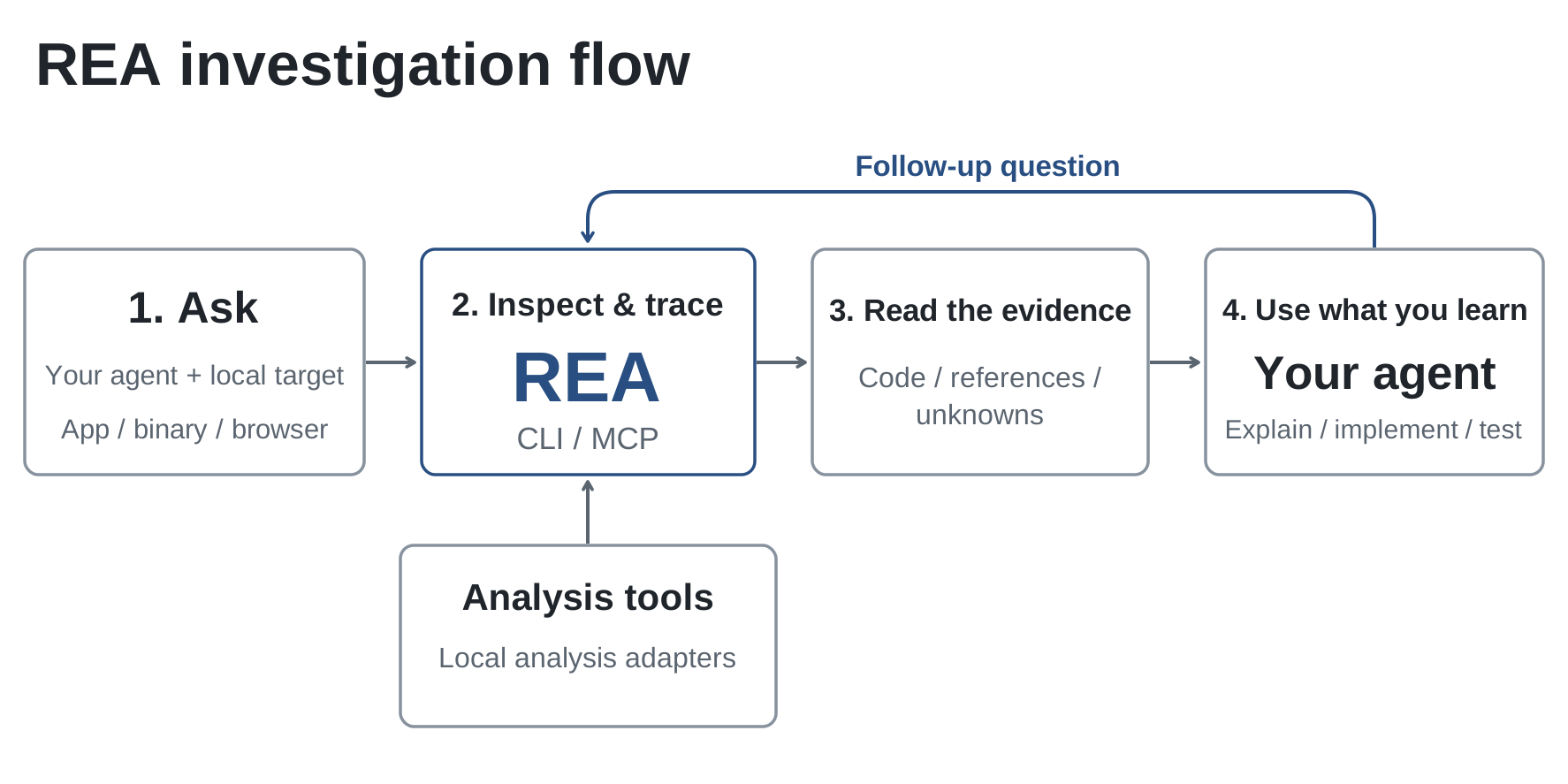 [打开完整尺寸的图示](https://raw.githubusercontent.com/morluto/rea/main/website/public/assets/figures/rea-investigation-flow.svg)。 <a id="current-status"></a> ## 可以分析什么 REA 需要 Node.js 22.x(>=22.19)、24.x(>=24.11)或 26+,以及 npm。额外工具和主机支持取决于分析目标:
<summary><strong>需要 Hopper、Ghidra 或 IDA 吗?</strong></summary> 深入的原生分析需要其中一个引擎。静态 JavaScript 和 .NET 检查不需要原生分析引擎。设置流程可以在你批准后安装 Hopper;Ghidra 和 IDA 则使用已有安装。见[提供方设置](https://github.com/morluto/rea/blob/main/docs/installation.md#hopper)。 </details> <details> <summary><strong>需要先启动 Hopper 吗?</strong></summary> REA 会在操作需要时启动 Hopper。在 macOS 上,首次运行时可能会出现对话框,让你选择演示模式或激活许可证。见 [Hopper 启动与故障排查](https://github.com/morluto/rea/blob/main/docs/installation.md#launcher-paths-and-troubleshooting)。 </details> <details> <summary><strong>从 skills.sh 安装 skill 有什么作用?</strong></summary>
<picture> <source media="(prefers-color-scheme: dark)" srcset="https://api.star-history.com/chart?repos=morluto/rea&type=date&theme=dark&legend=top-left" /> <source media="(prefers-color-scheme: light)" srcset="https://api.star-history.com/chart?repos=morluto/rea&type=date" /> <img alt="REA 的 GitHub Star 历史" src="https://api.star-history.com/chart?repos=morluto/rea&type=date" /> </picture> </a> ## 免责声明 REA 为合法的逆向工程研究、分析和重建提供工具。你有责任取得所需授权并遵守适用法律。项目不支持非法或未经授权的使用。 ## 参与贡献
- Tencent-Hunyuan/Hy-MemoryPython · 327 Stars
记忆管理、LLM代理记忆
Stars 统计更新于 2026/10/17 07:35:53
查看原始资料
编报时的 AI 中文解读
Hy Memory 是一个生产级的双系统认知记忆引擎和 Python SDK,为 LLM 代理提供聊天、工作和编码三种场景的记忆管道,支持分层长期记忆、事实与经验记忆以及代码版本演化链。
编报时的 README 依据
client.add("I love sci-fi movies, especially Interstellar", user_id="user_1") client.add([ {"role": "user", "content": "Recommend a movie"}, {"role": "assistant", "content": "Try Interstellar — a sci-fi masterpiece by Nolan"}, ], user_id="user_1") # Search: returns the profile / normal / proactive channels results = client.search("What movies does the user like?", user_ids=["user_1"], limit=10) for mem in results["memories"]["normal"]: print(f" [{mem['score']:.2f}] {mem['content']}") client.close() ``` ### 4. Working & Coding Memory
client.add( messages, scene="coding", # or "working" user_id="user_123", workspace_id="github.com/example/service", # optional: isolate by repository / project branch="fix/search-timeout", # optional: requires workspace_id ) result = client.search( "Which timeout implementation was finally kept?", scene="coding", user_ids=["user_123"], workspace_id="github.com/example/service", branch="fix/search-timeout", limit=5, ) result["facts"] # fact layer result["experiences"] # experience layer
pip install "hy-memory[qdrant]==2.0.1" # + Qdrant pip install "hy-memory[faiss]==2.0.1" # + FAISS pip install "hy-memory[graph]==2.0.1" # + Neo4j pip install "hy-memory[mysql]==2.0.1" # + MySQL cache pip install "hy-memory[rerank]==2.0.1" # + local multilingual cross-encoder rerank pip install "hy-memory[all]==2.0.1" # everything ``` ### 2. Configuration Only an LLM and an embedding endpoint are needed; any OpenAI-compatible service works: ```bash export MEMORY_LLM_API_KEY="sk-your-key" export MEMORY_LLM_BASE_URL="https://api.deepseek.com"
export MEMORY_LLM_MODEL="deepseek-chat" export MEMORY_EMBEDDER_API_KEY="sk-your-key" export MEMORY_EMBEDDER_BASE_URL="https://dashscope.aliyuncs.com/compatible-mode/v1" export MEMORY_EMBEDDER_MODEL="text-embedding-v3" export MEMORY_EMBEDDING_DIMS=1024 ``` Or use the OpenAI defaults with a single key: ```bash export OPENAI_API_KEY="sk-your-key" ``` See the [Environment Variable Reference](docs/env_reference.md) for the full list. ### 3. Chat Memory ```python from hy_memory import HyMemoryClient client = HyMemoryClient(mode="pro") # Write: plain text or OpenAI-format messages
Writes must include a tool-call trace (`tool_calls` or `role="tool"` messages) and take effect in `pro` / `ultra` mode only (`lite` ignores `scene` and stores everything as raw memory): ```python messages = [ {"role": "user", "content": "Fix the timeout in the search client."}, {"role": "assistant", "content": "", "tool_calls": [{ "id": "call_1", "type": "function", "function": {"name": "apply_patch", "arguments": '{"path":"src/search.py"}'}, }]}, {"role": "tool", "tool_call_id": "call_1", "name": "apply_patch", "content": "Patch applied successfully"}, ]
- carreypro/ict-trading-modelPython · 314 Stars
交易分析、模型验证
Stars 统计更新于 2026/10/17 07:35:53
查看原始资料
作者描述
ICT and SMC market-structure validation skill with deterministic OHLCV scanning
编报时的 AI 中文解读
这是一个用于Codex的ICT/SMC交易模型验证技能,通过多时间框架分析、流动性映射等步骤,对交易设置进行严格验证,并输出确认、发展中、无效或不可交易的状态。适用于使用Codex进行交易分析的用户。
编报时的 README 依据
npx skills add https://github.com/carreypro/ict-trading-model --skill ict-trading-model ``` Invoke it explicitly in Codex: ```text Use $ict-trading-model to analyze this chart. ``` It may also activate automatically when a request refers to ICT, SMC, liquidity sweeps, FVGs, order blocks, breakers, OTE, MSS, or BOS. ## Quick Start ### Review a chart screenshot ```text Use $ict-trading-model to review this chart. Reconstruct the setup in chronological order and identify: - higher-timeframe bias; - BSL and SSL; - liquidity sweeps; - displacement and strict FVGs; - MSS or BOS;
- valid order blocks or breakers; - entry conditions, invalidation, and targets; - valid opportunities and false signals. ``` A screenshot supports visual analysis only. Any price level, candle boundary, or timestamp that cannot be read reliably must be marked `unverified`. ### Analyze a live market ```text Use $ict-trading-model to analyze BTC-USDT-SWAP. Bias timeframe: 4H Structure timeframe: 15m Execution timeframe: 5m Return one status: confirmed, developing, invalidated, or no-trade. List the evidence for every required condition. Do not execute a trade. ```
- Did the proposed order block cause displacement and the structure break? - Is the entry still available, or has price already moved too far? ``` The skill challenges the thesis against the evidence instead of forcing the chart to match it. ### Analyze an OHLCV file ```text Use $ict-trading-model to analyze: /absolute/path/to/candles.json Scan both bullish and bearish structures and report the most recent candidates. ``` ## Analysis Workflow The skill follows the same nine-stage process for chart reviews, live markets, and historical OHLCV data. ### 1. Confirm the data context
- Wait for price to retrace into a premium-side FVG or valid order block. Invalidation: - Price closes back above the sweep high. Conclusion: the setup is not confirmed, and an early short is not justified. ``` The central rule is simple: missing evidence produces `developing` or `no-trade`, never an invented confirmation. ## Deterministic OHLCV Scanner The included scanner provides repeatable mechanical detection for candle data: ```bash python3 scripts/ict_scan.py \ --input /absolute/path/to/candles.json \ --direction auto \ --swing-width 2 \ --minimum-rr 2 ``` It detects:
Its core advantage is evidence-gated planning: an FVG, order block, or opposing candle cannot create a trade signal by itself. The complete sequence must be evaluated: ```text Higher-timeframe bias → Liquidity objective → Premium / discount location → Liquidity sweep → Displacement and strict FVG → Close-confirmed MSS or BOS → Retracement into OB / FVG / Breaker / OTE → Invalidation and target → Risk-to-reward validation ``` The skill produces analysis and conditional trade plans only. It never executes orders. ## What It Delivers | Capability | Output | | --- | --- |
├── agents/openai.yaml # Agent metadata ├── references/ict-model.md # ICT/SMC definitions and validation rules ├── references/output-contract.md # Required analysis output format ├── scripts/ict_scan.py # Deterministic OHLCV scanner └── tests/test_ict_scan.py # Scanner test suite ``` ## Limitations and Risk Notice - ICT/SMC labels are a price-action framework, not direct proof of institutional activity. - A screenshot cannot replace complete OHLCV data. - The scanner reports gross reward to risk and does not include fees, spread, slippage, or funding.
- Inverse contracts, options, and non-linear instruments require instrument-specific sizing and risk calculations. - Market structure is probabilistic. A technically valid setup can still fail. - This project is for education and research and is not financial advice. ## Development and Testing Run the test suite and syntax check from the repository root: ```bash python3 -m unittest discover -s tests -v python3 -m py_compile scripts/ict_scan.py ``` ## License Released under the [MIT License](LICENSE).
- Leonxlnx/earshotPython · 314 Stars
音频分析、音频转写、音频合成
Stars 统计更新于 2026/10/17 07:35:53
查看原始资料
作者描述
Ears for coding agents: let AI hear, review and make sound. CPU-only, open source.
编报时的 AI 中文解读
earshot 是一个为 AI 编码代理提供音频分析能力的工具,可让代理描述声音、匹配描述、查找片段、生成时间线等,并支持通过 CLI、Python API 和 MCP 服务器使用。
编报时的 README 依据
earshot turns sound into evidence an agent can reason about: what a file sounds like in words, how well it fits a description, the best moment inside a long recording, whether it is a real recording or code-synthesized, a second-by-second listening transcript of a whole film, an annotated picture of it, and a scorecard against professional launch films. It runs locally on CPU, as a CLI, a Python API and an MCP server. With ears, an agent can also **make its own sounds in code** and improve them by listening (`earshot forge`, below). ``` $ earshot describe enter.ogg
getting better. After a search the made sounds pass every model check, held-out ones included, so the model checks stop telling made from real; the 1/3-octave measurement still can. The realness model is easy to fool (a modal resonator plus a room and a noise floor reads "real"). Judge a made sound by the model-free measurements, spectrograms next to the references, robust re-renders, and a human blind test. ## Install Python 3.10+ and ffmpeg / ffprobe on PATH. CPU only; no GPU is used. ```bash git clone https://github.com/Leonxlnx/earshot && cd earshot python -m venv .venv
.venv/bin/python -m pip install torch --index-url https://download.pytorch.org/whl/cpu # Windows: .venv/Scripts/python .venv/bin/python -m pip install -e ".[mcp,llm,dev]" .venv/bin/python -m earshot doctor --load ``` The first model use downloads two open models (~1.4 GB) into `.cache/hf` inside the repo (or `EARSHOT_HOME`): CLAP `laion/larger_clap_general` (text-audio embeddings) and the AudioSet tagger `MIT/ast-finetuned-audioset-10-10-0.4593`. After that earshot works offline.
"is this the kind of sound I asked for" on single exposed sounds, picking among candidates, obvious code-synthesized sources. Hints only: tags of events inside a busy mix, music genre and mood. It cannot judge taste or emotion, provenance or licences, speech content, or anything above 14 kHz from the models. The launch scorecard describes the style of the 7 films behind it, not every good film. Details in [docs/LIMITS.md](docs/LIMITS.md). ## Repo map ``` earshot/ the package: CLI, Python API, MCP server, CPU model wrappers
- mistralai/timestralPython · 239 Stars
时间序列预测
Stars 统计更新于 2026/10/17 07:35:53
查看原始资料
编报时的 AI 中文解读
Timestral 是一个用于多变量概率预测的时间序列基础模型家族,支持仅过去和已知未来的协变量。该仓库提供独立的推理代码,可在 CPU 或 GPU 上运行,适合需要零样本预测的开发者。
编报时的 README 依据
| Timestral-5M | [`mistralai/Timestral-5M`](https://huggingface.co/mistralai/Timestral-5M) | 21 MB | | Timestral-28M | [`mistralai/Timestral-28M`](https://huggingface.co/mistralai/Timestral-28M) | 111 MB | | Timestral-123M | [`mistralai/Timestral-123M`](https://huggingface.co/mistralai/Timestral-123M) | 490 MB | | Timestral-209M | [`mistralai/Timestral-209M`](https://huggingface.co/mistralai/Timestral-209M) | 837 MB | `from_pretrained` downloads `config.json` and `model.safetensors` once to the Hub cache. ## Forecast ```python import numpy as np from timestral import TimestralForecaster
forecaster = TimestralForecaster.from_pretrained("mistralai/Timestral-209M") # device="cuda" for a GPU context = np.random.randn(2, 1, 2000).cumsum(-1) # (series, variates, time); NaN = missing forecast = forecaster.forecast(context, prediction_length=96) forecast.quantiles.shape # (2, 1, 96, 21): series, variates, horizon, quantile levels forecast.quantile_levels # (0.01, 0.05, 0.1, ..., 0.9, 0.95, 0.99) forecast.median # (2, 1, 96) forecast.quantile(0.9) # (2, 1, 96) ``` - `context` can be `(B, V, T)`, `(B, T)` (one variate per series) or `(T,)` (one series),
This repository provides standalone inference for Timestral models. It needs only PyTorch, NumPy, `safetensors` and `huggingface_hub`, and runs on CPU or GPU. > **License:** the code in this repository is licensed under [Apache 2.0](LICENSE). The Timestral model weights are released separately on the Hugging Face Hub under a [Modified MIT license](https://huggingface.co/mistralai/Timestral-209M/blob/main/LICENSE). See [License](#license). ## Highlights At launch, Timestral-209M ranked first among pretrained and zero-shot models on the three main public forecasting benchmarks:
- **Long context**: up to 32,768 steps. - **CPU-friendly**: no GPU needed for inference. ## Install ```bash pip install git+https://github.com/mistralai/timestral.git # Python >= 3.10, torch >= 2.4 ``` Or from a clone with [uv](https://docs.astral.sh/uv/), using the versions pinned in `uv.lock`: ```bash git clone https://github.com/mistralai/timestral.git && cd timestral uv sync --frozen source .venv/bin/activate ``` ## Models The weights are on the Hugging Face Hub, in the Mistral AI organization: | model | Hub repo | weights (fp32) | |---|---|---|
as a NumPy array or a torch tensor. The variates of a series are forecast jointly. - NaN marks a missing value. `observation_mask` (same shape, False = missing) can mark more. - The context is capped at the trained length (32768 steps); the most recent steps are kept. - Horizons longer than one decode block (32 patches = 1024 steps) are forecast block by block; each block's median is fed back as context. ### Loading options `from_pretrained` takes a Hub repo id or a local directory with `config.json` and `model.safetensors`.
We do not accept pull requests. Bug reports and questions are welcome as [GitHub issues](https://github.com/mistralai/timestral/issues). timestral is maintained by the team at Mistral AI. We answer issues on a best-effort basis and fix security vulnerabilities and major bugs. See [CONTRIBUTING.md](CONTRIBUTING.md) for how to report an issue. ## License The code in this repository (the `timestral` package and tests) is licensed under the Apache License 2.0. See the [LICENSE](LICENSE) file. The Timestral model weights are not covered by the Apache License 2.0. They are distributed
- anujasid/mcp-for-blender-proPython · 231 Stars
AI辅助3D建模、Blender自动化、模型服务接入
Stars 统计更新于 2026/10/17 07:35:53
查看原始资料
作者描述
AI assistant and MCP server for Blender: visual chat, scene tools, model selection, multi-agent workflows. Works with OpenAI, Claude, Gemini, Ollama and OpenCode. Blender AI automation, bpy scripting, 3D modeling, geometry nodes and MCP integration.
编报时的 AI 中文解读
为 Blender 提供 AI 辅助功能的插件,包含可视化聊天界面和 MCP 服务器,支持场景检查、对象创建、材质编辑、资产查找及多步骤工作流,适用于艺术家、技术美术和开发者。
编报时的 README 依据
 [Download](../../releases/latest) · [Getting started](docs/QUICKSTART.md) · [Connections and agents](docs/CONNECTIONS.md)  ## Turn a creative brief into scene operations Start with an idea. Ask the assistant to inspect your scene, create a product-display layout, arrange objects, assign materials or prepare an export. Follow its actions in the conversation and inspect the result in the viewport preview. Keep working in Blender throughout the process.
| **Multilingual menus** | Choose English, German, French, Spanish or Chinese for the main interface. | ## From a quick edit to an agent team Use **Single assistant** for direct, conversational work. For larger tasks, configure a **Team chain** with individual responsibilities, instructions and models. - **Manager:** breaks the request into assignments and acceptance criteria. - **Workers:** perform the assigned scene operations. - **Reviewers:** inspect results and approve work or return specific findings.
**mcp-for-blender-pro brings conversation, scene tools, model choice and agent workflows together.** It is designed for artists who want faster iteration, technical artists who automate repetitive work, and developers connecting AI tools to Blender. ## Why choose mcp-for-blender-pro? | Capability | What it gives you | |---|---| | **Blender-aware assistance** | Scene and object inspection gives the assistant context before it acts. | | **A visual Studio workspace** | Chat, scene objects, viewport snapshots, approvals and a task board in a companion window. |
Custom endpoints support OpenAI Chat Completions, Anthropic Messages and Ollama protocols. Choose models with tool-calling support; image-capable models can also interpret viewport screenshots. OpenCode-only free models are available through the OpenCode client.  ## Install and create 1. Download **`mcp-for-blender-pro.zip`** from [Releases](../../releases/latest). 2. In Blender, open **Edit → Preferences → Get Extensions → menu → Install from Disk**.
3. Select the ZIP, enable **mcp-for-blender-pro**, then open **3D Viewport → N → MCP Pro**. 4. Choose a provider, add your connection details and select a model. 5. Send a message in Blender or click **Open Studio Window**. The release bundle targets **Windows x64 with Blender 4.2 or later**. Keep Blender open while using Studio or an external client. ### Try these prompts > Inspect this scene and explain its object structure before making any changes. > Create a simple product-display scene with a pedestal, a camera and three lights. Give the pedestal a matte blue material.
> Duplicate the selected object into a neatly spaced row of five and show the viewport. > Find an appropriate Poly Haven asset for this scene and ask before importing it. ## Blender automation through MCP Launch **OpenCode Portable** from the sidebar to work through OpenCode with the Blender connection configured for you. OpenCode manages its own provider sign-in and model selection. Other compatible MCP clients can connect to the authenticated local endpoint described in the [connection guide](docs/CONNECTIONS.md). | Tool group | Included tools | |---|---|
Asset integrations include **Poly Haven, Sketchfab and Poly Pizza**. Configure service keys where required and follow the licenses of the assets you use. ## Stay in control of your scene Built-in chat supports operation approvals, cancellation after the current step and named undo steps for mutations. Python tool validation helps catch disallowed operations; it is not a security sandbox. External MCP clients manage their own approval policies.
- shishir0x/GoogleUnlimitedPowerShell · 223 Stars
照片自动备份、无限原画质上传
Stars 统计更新于 2026/10/17 07:35:53
查看原始资料
作者描述
Unlimited Google Photos auto-sync on Windows with Pixel original quality spoofing — native, portable, and zero-quota.
编报时的 AI 中文解读
GoogleUnlimited 是一个跨平台(Windows、macOS、Linux)的 Google Photos 自动同步工具,通过模拟 Pixel 设备实现无限原画质备份,不占用 Google Drive 存储空间。它监控本地文件夹,自动上传照片和视频,并提供命令行和交互式界面。
编报时的 README 依据
- **Multi-OS Interoperability**: Windows, macOS, and Linux scripts share the exact same SQLite database schema (`gphotos.db`), with dual-key lookups (`path` + `filename|filesize`) to seamlessly prevent duplicate uploads on shared or external partitions. - **Unified Clean Architecture (Zero Clutter)**: - **Windows**: `GoogleUnlimited.bat` provides an interactive menu or CLI commands (`watch`, `silent`, `status`, `logs`, `enable`, `disable`, `stop`).
- **macOS & Linux**: `google-unlimited.sh` unified runner (`watch`, `status`, `logs`, `setup`, `enable`, `disable`, `stop`). Zero separate script clutter. - **Real-Time Auto-Sync**: Monitors standard user folders instantly when files are downloaded or saved, with debounce protection for active downloads. - **Embedded SQLite Tracking**: Tracks every upload in `gphotos.db` — zero duplicate re-uploads, crash-resilient with automatic retry queues. - **Live Terminal Progress Bar**: Real-time dynamic progress bar, elapsed timer, and file size indicator. - **Background Auto-Start**:
- **Unlimited Google Photos Backup**: Spoofs Google Pixel mobile upload API ([`xob0t/gotohp`](https://github.com/xob0t/gotohp)) so all uploaded photos and videos consume **0 bytes of Google Drive / Google One storage**. - **Cross-Platform (Windows, macOS & Linux)**: - **Windows**: Native PowerShell engine with bundled portable `PSSQLite`. - **macOS**: Native Bash + `fswatch` engine supporting both Apple Silicon (M1-M4) and Intel Macs via universal binary. - **Linux**: Native POSIX Bash + `inotify-tools` engine for all major distributions (Ubuntu, Debian, Fedora, Arch).
GoogleUnlimited.bat stop # Stop any running background watcher ``` --- ## macOS Setup & Usage GoogleUnlimited runs natively on macOS (Apple Silicon M1/M2/M3/M4 & Intel) using `fswatch`, `sqlite3`, and the official universal Mach-O binary. ### 1. Clone the Repository ```bash git clone https://github.com/shishir0x/GoogleUnlimited.git cd GoogleUnlimited ``` ### 2. One-Command Setup Make executable and run setup (auto-installs `fswatch` via Homebrew and downloads the universal binary): ```bash chmod +x google-unlimited.sh ./google-unlimited.sh setup ```
git clone https://github.com/shishir0x/GoogleUnlimited.git cd GoogleUnlimited ``` ### 2. One-Command Setup Run setup to auto-install dependencies (`inotify-tools`, `sqlite3`, `curl`): ```bash chmod +x google-unlimited.sh ./google-unlimited.sh setup ``` ### 3. Sign In (One-Time) #### Option A: Retrieve `oauth_token` via Browser 1. In any web browser, open the Google Embedded Setup sign-in page: 👉 **[https://accounts.google.com/embedded/setup/v2/android](https://accounts.google.com/embedded/setup/v2/android)** 2. Sign in with your Google account and click **I agree**.
1. Double-click **`gotohp-x64.exe`** and click **Add Google account**. 2. Click **Open Google sign-in** and sign in with your Google account. 3. Sign in on the Google Embedded Setup page and click **I agree**. *(Note: The page buffering indefinitely is completely normal and expected).* 4. Open browser Developer Tools (**F12**): - Go to **Application** tab (Chrome/Edge/Brave) or **Storage** tab (Firefox). - Under **Cookies**, click `https://accounts.google.com`. - Copy the value of the **`oauth_token`** cookie. 5. In `gotohp`, paste the token and click **Connect account**.
*(If Homebrew is not installed, install it with: `/bin/bash -c "$(curl -fsSL https://raw.githubusercontent.com/Homebrew/install/HEAD/install.sh)"`)* ### 3. Sign In (One-Time) 1. Open the Google Embedded Setup sign-in page: 👉 **[https://accounts.google.com/embedded/setup/v2/android](https://accounts.google.com/embedded/setup/v2/android)** 2. Sign in with your Google account and click **I agree** *(buffering indefinitely is normal)*. 3. Press **Option + Command + I** (or right-click → **Inspect**) to open Developer Tools:
- OpenMOSS/MOSS-ImagePython · 202 Stars
图像生成、文本渲染、布局控制
查看原始资料
作者描述
Official repository for MOSS-Image, a 5B-parameter base DiT model with high-quality text rendering, layout generation, and efficient fine-tuning.
编报时的 AI 中文解读
MOSS-Image 是一个用于生成高质量图像的基础模型,支持文本渲染、布局控制和高效微调,适合需要生成包含清晰文字和复杂布局图像的开发者。
- zgsfsec/Full-Chain-Sentinel-SystemTypeScript · 139 Stars
渗透测试辅助、漏洞管理、安卓设备控制
查看原始资料
作者描述
【全链哨兵】全流程渗透测试 Agent 系统,安全服务渗透测试辅助工具,禁止用于非法攻击。
编报时的 AI 中文解读
全链哨兵是一个面向授权渗透测试的Agent系统,提供中文Web控制台、容器化作业环境和安卓设备插件,支持Web、小程序和APP三端测试流程。
- Enderfga/SolarRendererPython · 97 Stars
视频生成、结构视频渲染
查看原始资料
作者描述
SolarRenderer: Few-Step Generative Reference Rendering
编报时的 AI 中文解读
SolarRenderer 是一个将结构视频(如灰度框、语义图、骨架、深度、人体网格或草图)转换为成品视频的生成式渲染工具,支持通过提示词和首帧控制风格,仅需四步采样即可生成视频片段。
- Administracion-Abierta/AutoFirmeTypeScript · 88 Stars
文档签名、签名验证
查看原始资料
作者描述
Client-side-rendered SPA: sign and verify documents with X.509 certificates, entirely in the browser. No backend, no key material leaving the client.
编报时的 AI 中文解读
这是一个在浏览器中运行的文档签名和验证工具,支持X.509证书,无需后端,私钥不会离开客户端。适用于需要签署或验证PDF、XML等文档的用户,特别是西班牙政府相关场景。
- black-forest-labs/flux-3-image-kleinPython · 77 Stars
图像生成、图像编辑、布局控制
查看原始资料
作者描述
FLUX 3 Image Klein: reference inference code
编报时的 AI 中文解读
FLUX 3 Image Klein 的参考推理代码,用于文本生成图像、基于最多10张参考图像的编辑以及边界框布局控制,并附带提示词上采样器。适合需要自托管或研究该图像模型的开发者。
- CluvexStudio/StrataKotlin · 70 Stars
An open-source file manager for Android: two panes, archives, APK and DEX editing, a code editor, network storages and an encrypted vault. No ads, no accounts, no tracking.
查看原始资料
作者描述
An open-source file manager for Android: two panes, archives, APK and DEX editing, a code editor, network storages and an encrypted vault. No ads, no accounts, no tracking.
- YuuLuo/a7c2-service-preload未标注语言 · 62 Stars
安全研究
查看原始资料
作者描述
Research on A7C II service authentication, Jiritsu path resolution, and preload-based code execution.
编报时的 AI 中文解读
该仓库记录了索尼ILCE-7CM2相机固件2.01版本中,从USB服务会话到一次性root代码执行的完整攻击链研究,包括认证交换、路径解析和预加载执行。适用于对相机安全研究或固件逆向感兴趣的技术人员。
- SinapisAI/collective-model-intelligencePython · 50 Stars
模型协调、模型评估
查看原始资料
作者描述
From a universe of models to Collective Model Intelligence.
编报时的 AI 中文解读
该项目提出集体模型智能的概念,通过模型评估、路由和调度,协调多个模型以提升任务效果和资源效率,并提供了相关技术报告、基准数据集和开源代码。