从浏览器里的PS2到桌面上的智能体:今日开源项目中的实用主义与趣味性
日报 · 2026-10-13 · GitHub 新星
覆盖日期:2026-10-13 · 北京时间
发布时间:2026/10/14 14:30:30
修订于 2026/10/21 02:31:45 · 原刊收录 78 个项目,修订版采用 65 个仍可公开项目。本版不作跨期比较。
本期日报收录了65个项目,涵盖AI代理、开发工具、桌面增强、逆向工程等多个领域。本文挑选了其中12个代表性项目,从AI代理的实用化、开发工具的精细化、桌面体验的趣味化以及逆向工程与复古游戏等角度展开,探讨了这些项目解决的具体问题、适用人群以及各自的特色与限制。
修订版说明:原刊收录 78 个项目,本版依据 65 个仍可公开项目。对比资料不再完整,本版不作跨期比较。原刊物快照和历史文章保留。
今天的开源项目名单里,既有像 NVIDIA 的 USD BRep 这样面向专业工作流的底层库,也有像 lolPing 这样纯粹为了好玩而生的桌面小玩具。它们共同的特点是都试图解决一个具体的问题,并且把解决方案打磨得相当细致。我们从中挑选了 12 个项目,按主题梳理一下它们各自的价值和适用场景。
1. AI 代理:从个人助手到安全测试
AI 代理是今天名单里最热闹的领域,但方向却大不相同。
1.1 nanoMuse:真正属于你自己的个人智能体
nanoMuse 是一个开源的个人智能体,它的定位很明确:不依赖别人的云,而是跑在你自己的设备上。它支持 Android、iPhone/iPad、macOS、Windows、Linux 以及浏览器,并且整套系统——手机应用、桌面应用、Web 控制台和连接它们的 relay——都在同一个仓库里,可以自行部署。
它的核心能力包括操作设备屏幕、跨设备派发任务(比如在手机上发消息,让它在 PC 上执行)、在应用关闭后按计划继续执行目标,以及在执行不可逆操作前先询问用户。这些功能让它更像一个真正能“做事”的助手,而不是一个只会聊天的机器人。
对于开发者来说,nanoMuse 的吸引力在于它的开放性和可定制性。登录后可以使用社区 relay 提供的免费模型额度,用完后可以换成自己的 API 密钥。它的记忆和状态都以 Markdown 文件存储,用户可以随时查看和编辑。不过需要注意的是,屏幕操作在 iOS 上不可用,因为系统不允许。
仓库地址:https://github.com/nano-muse/nanoMuse
1.2 ARTEX:AI 驱动的自主渗透测试系统
ARTEX 是一个 AI 自主渗透测试系统,曾获得百度“agent+”攻防挑战赛冠军。它提供了仪表盘、任务管理、资产图、探索链路、流量录制和人在环路对话等功能,适合安全研究人员在本地隔离环境中进行技术验证。
ARTEX 的一个亮点是支持从 ScopeSentry 直接同步资产数据,免去重复收集的麻烦。它依赖 PostgreSQL 数据库,探索功能需要配置 LLM API 密钥(Anthropic 或 OpenAI)。项目采用 AGPL-3.0 许可证,作者明确声明仅供个人学习、代码研究与本地技术验证使用,不得用于对任何线上系统或网站发起实际测试。
仓库地址:https://github.com/trhhubsd/ARTEXX
1.3 vm2api:虚拟机级的订阅转 API 网关
vm2api 解决的是一个更具体的问题:如何将 Anthropic 和 OpenAI 的订阅转化为标准 API。它采用完全隔离的虚拟机环境,运行官方真实客户端进程,而不是简单的 HTTP 逆向。这种方式旨在避免账号被封禁的风险,提供更稳定、长效的订阅转 API 服务。
vm2api 支持 Anthropic(Claude Pro/Team/Enterprise/Max)和 OpenAI(ChatGPT/Codex)订阅,输出标准的 OpenAI 和 Anthropic 兼容接口。它提供了可视化管理面板,可以通过 Docker Compose 部署。不过,它采用非商用许可证,任何商业运营都需要获得作者的正式书面授权。
仓库地址:https://github.com/dofastted/vm2api
2. 开发工具:让专业工作流更顺畅
除了 AI 代理,一些面向专业开发者的工具也值得关注。
2.1 USD BRep:NURBS 实体建模库
NVIDIA 开源的 USD BRep 是一个独立的 C++ 和 Python 库,用于基于 NURBS 的边界表示(BRep)实体建模,并提供修复 USD 资产中 BRep 几何的工具。它支持通过命令行构建和测试,并提供了 Python 库接口。
这个库的构建要求比较严格:需要 Git 和 Git LFS,Windows 上构建 C++ 需要 Visual Studio 2019/2022 及 MSVC v142 工具集,macOS 仅支持 Apple Silicon。项目目前不接受贡献,但欢迎通过问题跟踪器报告问题。
仓库地址:https://github.com/NVIDIA-Omniverse/usd-brep
2.2 RustGIS:纯 Rust 编写的 GIS 应用
RustGIS 是一个用 Rust 编写的免费开源 GIS 应用,用于制图、分析和共享地理空间数据。它支持桌面端(Windows、macOS、Linux)和网页端(通过 WebAssembly 编译),并且强调数据本地化和隐私保护——文件在本地读写,只有在你主动请求时才会使用网络。
RustGIS 的一个特色是“一切皆命令”,每个按钮都是一个命令,可以通过 rustgis-cli 脚本化操作,也可以让 AI Assistant 代为执行。它集成了超过 1000 个 GeoLibre 和 Whitebox 工具,支持地形、水文、LiDAR 和遥感分析。从源码构建需要 Rust 1.90 或更高版本。
仓库地址:https://github.com/opengeos/RustGIS
2.3 finder-menu:为 macOS Finder 补齐右键菜单
finder-menu 是一个为 macOS Finder 添加右键菜单增强功能的工具,提供新建文件、在终端打开、用 IDE 打开、复制路径和跳转上级目录等操作。它完全本地运行,没有网络代码,也没有遥测。
这个工具适合需要提升文件管理效率的 macOS 用户。它支持通过 Homebrew 或源码安装,安装后无需启动,Finder 会自动加载扩展。需要注意的是,应用未经过 Apple 公证,首次使用“跳转上级目录”时需授权控制 Finder。
仓库地址:https://github.com/nikgrbn/finder-menu
3. 桌面趣味:把游戏元素带进日常
有些项目纯粹是为了好玩,但做得非常用心。
3.1 lolPing:在桌面上使用英雄联盟的 ping 和表情
lolPing 是一个桌面工具,让你在 Windows 和 macOS 上通过按住 Alt 或 Ctrl 并拖拽,在任意应用和显示器上使用英雄联盟的 ping 和表情轮盘,并带有原始动画和音效。它甚至可以在系统卡死对话框上打信号,或者让 Discord 或 OBS 直播间的朋友看到你的 ping。
lolPing 是一个“桌面玩具”,它不读取、修改或挂钩英雄联盟本身。它支持自定义触发键、表情轮盘和音效,并且可以添加自己的图片作为表情。Windows 版本为 64 位,macOS 版本为 Apple Silicon 实验性支持。
仓库地址:https://github.com/darrenprx/lolPing
3.2 Meltype:自动区分日英输入的日语输入法
Meltype 是一款日语输入法,能够自动区分罗马字输入中的日文和英文,无需手动切换半角/全角键。它适合需要混合输入日英的用户,比如在代码注释中写日语,在代码中写英文。
Meltype 支持 Windows 10/11,Mac 版和 Linux 版为预览版。它提供了 Meltype IME 和 Meltype 键盘两种模式,并支持表情转换、拼写错误提示、预测转换和应用级设置。
仓库地址:https://github.com/yksr-melt/Meltype
4. 逆向工程与复古游戏:探索技术的边界
最后,我们来看看逆向工程和复古游戏领域的一些有趣项目。
4.1 awesome-reverse-engineering:逆向工程资源精选
这是一个精选的逆向工程工具和学习资源列表,涵盖二进制、应用、固件、文件格式和协议的分析。它按照任务分类,比如学习汇编、识别可执行文件、分析恶意软件、检查移动应用或固件等,每个条目都描述了其用途,商业工具会特别标注。
这个列表适合需要查找逆向工具或学习逆向工程基础的用户。它还包括了书籍推荐和在线课程资源。
仓库地址:https://github.com/morluto/awesome-reverse-engineering
4.2 ps2-web-recomp:在浏览器中运行 PS2 游戏
ps2-web-recomp 是一个将 PS2 游戏在浏览器中无需模拟器运行的项目。它通过静态重编译将游戏的 Emotion Engine 机器码转换为 C++,再编译为 WebAssembly,并重新实现了 PS2 的操作系统和硬件,使用 WebGPU 进行绘制。
目前该项目已成功移植了《GT赛车4》和《战神2》两款游戏。它需要 git、CMake、Ninja、C++20 编译器(推荐 clang)、Python 3,以及 7-Zip(如果镜像为 .7z 格式)。浏览器需要 WebGPU 支持。需要注意的是,目前仅成功移植了两款游戏,其他游戏可能因未实现的系统调用或 IOP 库函数而停止。
仓库地址:https://github.com/snuri00/ps2-web-recomp
5. 结语
今天的开源项目展现了不同的实用主义:有的致力于让 AI 代理真正成为个人助手,有的在优化专业工作流,有的在给桌面体验增添趣味,还有的在探索技术的边界。无论你是开发者、安全研究人员、GIS 用户,还是只是想找点好玩的工具,都能从中找到值得一试的项目。
文章生成于 2026/10/21 02:31:45 · 依据本期保存的资料撰写
本期项目与来源资料
收录数按本期首次达标收录的项目统计。
- NVIDIA-Omniverse/usd-brepC++ · 1,251 Stars
BRep建模、USD资产修复
Stars 统计更新于 2026/10/14 14:25:43
查看原始资料
作者描述
USD BRep is a standalone C++ and Python library for NURBS-based boundary representation (BRep) solid modeling
编报时的 AI 中文解读
USD BRep 是一个独立的 C++ 和 Python 库,用于基于 NURBS 的边界表示(BRep)实体建模,并提供修复 USD 资产中 BRep 几何的工具。
编报时的 README 依据
All other build-time dependencies — OpenUSD, Python 3.12, pybind11, **premake**, and the `repo_*` tools — are pulled automatically via Packman when you build. ## Using this repo Prerequisites are listed under [Requirements](#requirements). Use `./repo.sh` on Linux and macOS, `./repo.bat` on Windows. macOS: [macOS local development](#macos-local-development). ### Build it Run prebuild before building a fresh checkout or after deleting `_build`. It stages the omniSolid schema plugin in `_build/schema/omniSolid/resources`; `repo build`
`usd.heal_file` heals BrepArray definitions in the layers used by the current USD composition and writes the scene with the healed geometry, keeping its layers, references, native instancing, transforms and materials. External layers used only by unselected variants remain referenced but are not healed. Material subset opinions outside the BRep's defining prim spec are rejected rather than lost. ```python import usd_brep usd_brep.usd.heal_file("input.usdc", "input_healed.usdc") ```
# USD BRep Standalone Omniverse repo containing USD BRep (NURBS boundary-representation solid modeling) libraries. ## Requirements - [**Git**](https://git-scm.com/downloads) and [**Git LFS**](https://git-lfs.com/): Git LFS is required for the large binary fixtures tracked in `.gitattributes` (USD assets, STEP/IGES/JT models). - **(Windows - C++ Only) Microsoft Visual Studio (2019 or 2022)** with the MSVC C++ toolset:
- Install from [Visual Studio Downloads](https://visualstudio.microsoft.com/downloads/) (or **Build Tools for Visual Studio**) with the **Desktop development with C++** workload selected. A VS install without the C++ toolset is not enough. - The build uses this **host-installed** compiler (`msbuild.link_host_toolchain` in `repo.toml`), not Packman `msvc`. - `msbuild.vs_version` is pinned to `vs2019`, so VS 2022 users also need the **MSVC v142 build tools** component.
- **(Windows) [Microsoft Visual C++ Redistributable](https://learn.microsoft.com/cpp/windows/latest-supported-vc-redist)**: Required to run the built binaries, which link the VC runtime dynamically rather than bundling it. The **Desktop development with C++** workload above ships the redistributable, so a machine set up to build already has it — install it separately only on machines that run the binaries without Visual Studio. - **(Linux) build-essential**: `sudo apt-get install build-essential`
Set `PYTHONPATH="$PWD/_build/macos-universal/release"` to import Python extensions. Packman OpenUSD/Python packages are not available on macOS. The macOS premake package (`premake@5.0.0-beta1+nv1-macos-universal`, `deps/host-deps.packman.xml`) is not on the public Packman server either; supply it through a user-level Packman configuration. Avoid `./repo.sh build -x`; delete `_build`, `_compiler`, and `_repo` to clean. ## Contributing This project is currently not accepting contributions. Issues and bug reports are welcome through the project issue tracker, and security
- trhhubsd/ARTEXXGo · 1,207 Stars
自主渗透测试、资产同步、漏洞复测
Stars 统计更新于 2026/10/14 14:25:43
查看原始资料
作者描述
AI 自主渗透测试系统 | 百度“agent+”攻防挑战赛冠军项目 Autumn-27/ARTEX
编报时的 AI 中文解读
ARTEX 是一个 AI 自主渗透测试系统,提供仪表盘、任务管理、资产图、探索链路、流量录制和人在环路对话等功能,适用于安全研究人员在本地隔离环境进行技术验证。
编报时的 README 依据
装好后打开 **http://localhost:8787** (首次进入 `/setup` 设置管理员密码)。 ### 方式二:Docker Compose(推荐) ```bash git clone https://github.com/trhhubsd/ARTEXX cd ARTEX cp .env.example .env # 填 POSTGRES_PASSWORD、可选 ANTHROPIC_API_KEY docker compose up -d # 拉取 autumn27/artex 镜像 + postgres # → http://localhost:8787 ``` 镜像已含常用工具(ripgrep/curl/vim/npm/nmap…);`./skills` 与 `./data` 以绑定挂载持久化。 远程 MCP 可在系统设置中选择 `http`(Streamable HTTP)或 `sse`(旧版 SSE)。 旧版 SSE 服务通常使用 `GET /sse` 建立事件流,再通过服务返回的 `/message?sessionId=...` 接收 JSON-RPC 请求;配置时将 URL 填为 `/sse`,请求头按 `Authorization=Bearer <token>` 填写。
- 在「**资产同步**」页填 ScopeSentry 的地址与 API Key,接入数据源; - 按**项目**或**任务**维度选择要同步的目标与资产类型(域名 / 子域 / IP / 端口 / 站点 / 端点…); - 一键导入并按公司资产范围归并,直接进入 ARTEX 的资产图供 agent 探索使用。 --- ## 安装 > 依赖数据库 **PostgreSQL**;探索需配置 **LLM**(`ANTHROPIC_API_KEY` 或 `OPENAI_API_KEY`,也可在 UI 里配)。 ### 方式一:一键安装脚本(推荐) ```bash git clone https://github.com/trhhubsd/ARTEXX cd ARTEX ./install.sh ``` 脚本会:检测 / 自动安装 Docker → 让你选 **① 全部 Docker** 或 **② 本地编译运行**: - **① 全部 Docker**:填一个 Postgres 密码(可回车随机)→ 自动写 `.env` → `docker compose up -d`。 - **② 本地运行**:选数据库(连已有 / 用 Docker 起一个)→ 生成 `config.json` → `go` 编译内嵌单二进制 → 启动。
本项目采用 **GNU Affero General Public License v3.0(AGPL-3.0)** 授权,完整条款见仓库根目录的 [LICENSE](LICENSE) 文件。 这意味着任何人都可以自由使用、修改和分发本项目,但**衍生作品必须同样以 AGPL-3.0 开源**;特别地,**若你修改本项目并通过网络(如部署为在线服务)向用户提供,也必须向这些用户公开对应的完整源码**。 > ⚠️ **重要提示**:开源协议本身不限制软件的使用用途。以下的「使用限制」与「免责声明」是作者对使用者的额外约定与郑重声明,请务必遵守。 **ARTEX 仅供个人学习、代码研究与本地技术验证使用,不得用于对任何线上系统或网站发起实际测试。** ### 允许使用范围 - 仅可用于**阅读、学习与研究本项目源码**,以及在**本地隔离环境**中进行技术原理验证; - 适用于个人学习、学术研究、代码审阅等非攻击性用途。 ### 禁止事项 - **严禁使用本工具对任何网站、线上服务或联网系统发起扫描、探测、利用或攻击**(无论是否获得授权、是否为自有资产); - 严禁将本工具用于任何实际的渗透测试、攻防对抗或生产环境; - 严禁将本工具用于非法入侵、数据窃取、勒索、拒绝服务或任何破坏性、犯罪性活动; - 严禁利用本工具从事违反所在国家/地区法律法规的行为。
- nano-muse/nanoMuseSwift · 1,129 Stars
个人智能体、跨设备任务、模型服务接入
Stars 统计更新于 2026/10/14 14:10:48
查看原始资料
作者描述
nanoMuse: an open-source personal agent for every device you own. One agent with a name and a look of its own that does things, keeps working while the app is closed, remembers you, and asks before anything you cannot undo. On Android, iPhone and iPad, Windows / macOS / Linux and in the browser; your phone's screen and your computer as its hands.
编报时的 AI 中文解读
nanoMuse 是开源个人智能体,可在手机、桌面和浏览器上运行,能操作设备、跨设备派发任务、定时执行并在不可逆操作前询问。适合希望在自己设备上部署个人智能体的用户与开发者。 整套包含手机应用、桌面应用、Web 控制台和连接它们的 relay,均可自行部署;登录后可使用社区 relay 的免费模型额度,额度用尽后可改用自有密钥。
编报时的 README 依据
<td width="50%" valign="top"><b>Does things.</b><br>A Linux shell, a browser, MCP servers and skills, and, with <i>Hands</i> on, the apps on your phone and the windows on your computer through their screens, for everything that never had an API.</td> <td width="50%" valign="top"><b>Asks first.</b><br>A stop before deleting, sending or paying, remembered for once, this chat or always; passwords and codes are yours to type. A login or a CAPTCHA is handed to you, <i>Done</i> resumes.</td> </tr> <tr>
<td width="50%" valign="top"><b>Reaches your other devices.</b><br>Say it on the phone, it runs on your PC; <code>@Mac …</code> at the start of a message sends the task there. Approvals come back to the device in your hand.</td> <td width="50%" valign="top"><b>Keeps going.</b><br>Goals checked on a schedule, routines that run while the app is closed, a feed written for you each morning.</td> </tr> <tr> <td width="50%" valign="top"><b>Remembers you.</b><br>What it is, what it knows about you and when it wakes are Markdown files you can read and edit.</td>
notes](https://github.com/nano-muse/nanoMuse/releases/tag/v1.0.4) · [try it in the browser](https://demo.nanomuse.dev/). > [!NOTE] > **nanoMuse keeps evolving** > > A personal agent should not live only in someone else's cloud, so nanoMuse is the open-source, low-cost alternative: on your own devices, with a model you choose and a relay you can host yourself. We want to build it with developers and users everywhere, so that each person truly owns a personal agent. Open an [issue](https://github.com/nano-muse/nanoMuse/issues/new/choose) or send a [pull request](CONTRIBUTING.md); either one
- `2026-09-25` 🎉 nanoMuse is released on GitHub under GPL-3.0-or-later: an Android app built on OpenMinis 1.13; the relay, the desktop app and the iPhone app came in the days after. Every version: [releases](https://github.com/nano-muse/nanoMuse/releases). ## Install | | | |---|---| | **Browser** | [demo.nanomuse.dev](https://demo.nanomuse.dev/): a nanoMuse on a simulated phone, after a sign-in. A demo; the apps below are the real thing |
| **Linux** x64 | [AppImage](https://github.com/nano-muse/nanoMuse/releases/download/v1.0.4/nanoMuse-Desktop-1.0.4-linux-x64.AppImage) · [.deb](https://github.com/nano-muse/nanoMuse/releases/download/v1.0.4/nanoMuse-Desktop-1.0.4-linux-x64.deb) · [tar.gz](https://github.com/nano-muse/nanoMuse/releases/download/v1.0.4/nanoMuse-Desktop-1.0.4-linux-x64.tar.gz) | | **Docker** | `bash scripts/self-host.sh --local` for your own relay; `docker compose up -d app` for the web app on a server of yours; see [self-hosting](docs/self-hosting.md) |
| **Android** 8.0+, arm64 | [nanoMuse-1.0.4-arm64.apk](https://github.com/nano-muse/nanoMuse/releases/download/v1.0.4/nanoMuse-1.0.4-arm64.apk): every version is signed with the same key and installs over the last | | **iPhone / iPad** | [TestFlight](https://testflight.apple.com/join/ZHexbDqc): a beta that passed Apple's beta review; the link installs it · [iOS](docs/ios.md) |
| **macOS** 12+ | [Apple Silicon](https://github.com/nano-muse/nanoMuse/releases/download/v1.0.4/nanoMuse-Desktop-1.0.4-mac-arm64.dmg) · [Intel](https://github.com/nano-muse/nanoMuse/releases/download/v1.0.4/nanoMuse-Desktop-1.0.4-mac-x64.dmg). Not notarised: right-click → *Open* the first time | | **Windows** 10+ | [nanoMuse-Desktop-1.0.4-win-x64.exe](https://github.com/nano-muse/nanoMuse/releases/download/v1.0.4/nanoMuse-Desktop-1.0.4-win-x64.exe): click *Run anyway* once |
All downloads come from the [latest release](https://github.com/nano-muse/nanoMuse/releases/latest); the same files are on [nanomuse.cn/dl](https://nanomuse.cn/dl/) when GitHub is slow where you are. Open the app, sign in with an e-mail or a mainland-China phone number, and it has a model to think with. The phone, the desktop and the web share one account and show the same conversations. ## What it does <table> <tr>
| Where the agent runs | A cloud VM per user | The phone it is installed on | Your phone, your computer, or a server of yours, one account across them | | Apps without an API | Out of reach; the VM never touches your devices | An accessibility CLI on Android | The screen as a hand on the phone and the computer: screenshots, APIs first, you take over for logins. Not on iOS, where the system does not allow it | | Other devices | Clients of one VM | The one it is installed on | Devices ask each other for things over the hub, with approvals where you are |
- dofastted/vm2apiJavaScript · 1,104 Stars
模型服务接入、模型接口转发
Stars 统计更新于 2026/10/14 14:20:55
查看原始资料
作者描述
vm2api 使用虚拟机完全拟真方案的订阅转api
编报时的 AI 中文解读
vm2api 是一个将 Anthropic (Claude Pro/Team/Enterprise/Max) 和 OpenAI (ChatGPT/Codex) 订阅转化为标准 API 的虚拟机级生产网关,通过完全隔离的VM环境和官方真实客户端进程实现稳定、长效的订阅转API服务。适用于需要将AI订阅用作标准API的组织、开发者或高级用户。
编报时的 README 依据
Traditional methods of converting AI subscriptions into API endpoints via simple reverse proxies frequently result in immediate account suspensions, stealth downgrades, and token corruption. **vm2api** is an enterprise-grade virtual machine gateway designed for ultra-reliable subscription-to-API infrastructure: - **Universal Support**: Seamlessly converts **Anthropic (Claude Pro / Team / Enterprise / Max)** and **OpenAI (ChatGPT / Codex)** subscriptions into robust standard APIs.
- **Genuine Client Process**: Runs the **authentic official Claude Code CLI system process** inside an isolated VM / container instance instead of fragile HTTP emulation. - **High-Fidelity Emulation**: From physical SMBIOS, NIC MAC, and Machine-ID to dedicated per-slot network egress and pre-hop risk gates. - **Standard Compatibility**: Provides drop-in replacements for Anthropic `/v1/messages` and OpenAI `/v1/chat/completions` / `/v1/responses`. ## Recent changes (1.3.133) Since 1.3.122, the caller-visible changes are:
- **OpenAI 兼容协议**:`POST http://<您的IP>:8787/v1/chat/completions` ```bash # 调用示例(以 Anthropic 原生接口为例) curl -sS http://127.0.0.1:8787/v1/messages \ -H "Authorization: Bearer $VM2API_API_KEY" \ -H "content-type: application/json" \ -d '{ "model": "claude-sonnet-5-5", "max_tokens": 128000, "messages": [{"role": "user", "content": "Hello!"}] }' ``` --- ## 🔌 接口与协议兼容 vm2api 内置全栈自适应网关,原生支持以下所有主流生态: | 协议入口 | 对应标准 | 兼容客户端与场景 | |:---|:---|:---| | `/v1/messages` | Anthropic Messages API | Claude 官方 SDK、Cursor、Continue、LibreChat、Roo Code |
curl -sSLO https://raw.githubusercontent.com/dofastted/vm2api/main/docker-compose.yml curl -sSL -o .env https://raw.githubusercontent.com/dofastted/vm2api/main/.env.example chmod 600 .env # 按需修改 .env 中的关键变量(VM2API_API_KEY, VM2API_ADMIN_PASSWORD, VM2API_DB_SECRET) docker compose pull && docker compose up -d ``` ### 3. 访问与调用 服务启动后,系统暴露统一服务端口(默认 `8787`): - **可视化管理面板**:`http://<您的IP>:8787/console`(默认账号:`admin` / 密码:`123456` 或自定义环境变量) - **服务健康探活**:`GET http://<您的IP>:8787/health` - **Anthropic 协议调用**:`POST http://<您的IP>:8787/v1/messages`
> 完整测试套件与详细数据归档请参阅:[docs/benchmarks/README.md](docs/benchmarks/README.md)。 --- ## 🚀 快速开始(生产部署) 推荐在 **Ubuntu 24.04 LTS** 环境使用官方 Docker Compose 一键启动。 ### 1. 一键脚本安装(推荐) ```bash # 生产环境一键拉取并安装 curl -sSL https://raw.githubusercontent.com/dofastted/vm2api/main/deploy/install.sh | sudo bash # 以后更新 curl -sSL https://raw.githubusercontent.com/dofastted/vm2api/main/deploy/install.sh | sudo bash -s -- upgrade ``` ARM64(aarch64)主机用同一条命令,脚本自动选择 `-arm64` 控制面镜像并准备 QEMU;实验性支持,见 [docs/ARM64.md](docs/ARM64.md)。 ### 2. 手动 Docker Compose 启动 ```bash mkdir -p /opt/vm2api && cd /opt/vm2api
| 5 | Passed egress | Everything the gates allowed. The upstream's own refusals are listed separately, so a miss is visible. | Enters a slot | Open a hit and read the body. A false positive means tighten that gate, not delete the slot. Requests from before this recording show as unchecked. Full rules: [docs/RISK.md](docs/RISK.md). ### 4️⃣ Completely Isolated Network (1 VM = 1 Egress) - **Zero Cross-Account Contamination**: Every VM slot is strictly bound to its own dedicated SOCKS5 proxy or local egress gateway.
<p style="color: #777; font-size: 12px; margin-top: 10px;">特别鸣谢 <b>LINUX DO</b> 等开源技术社区同仁的支持与建议</p> </div> --- ## 📈 Star History [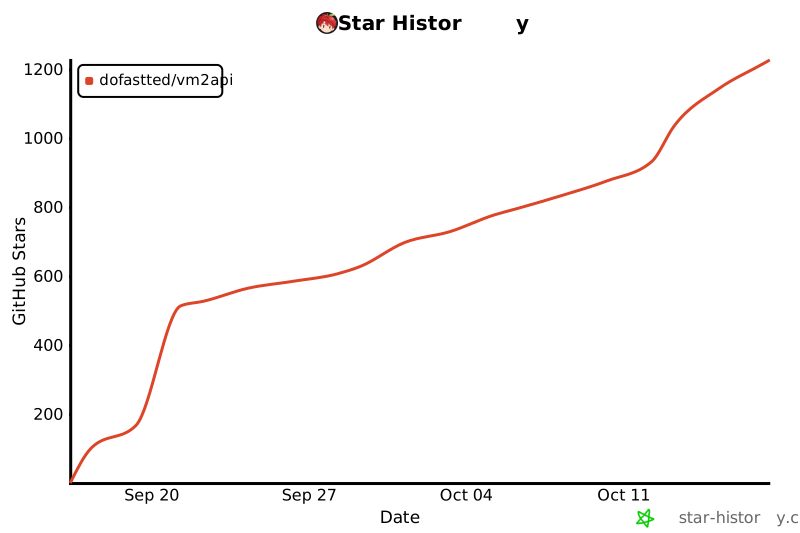](https://star-history.com/#dofastted/vm2api&Date) --- ## 📜 许可证与免责声明 / License - **个人与非商用**:本仓库遵循 [Noncommercial License](LICENSE),仅供个人学习、技术研究与个人自建使用。 - **商业使用授权**:任何将本项目用于商业运营(包括对外付费 API、作为转售云服务基础组件、公司内部营利用途等)**必须事先取得作者正式书面授权**。授权联系请洽 [Telegram @VM2API](https://t.me/VM2API)。 - **免责声明**:vm2api 为独立的开源实验项目,与 Anthropic PBC 或 OpenAI 无任何直接关联。相关商标权属均归其对应公司所有。
- darrenprx/lolPingTypeScript · 1,092 Stars
桌面快捷操作、表情轮盘
Stars 统计更新于 2026/10/14 14:25:43
查看原始资料
作者描述
League of Legends ping wheel for your Windows desktop. Hold Alt, drag, and ping anywhere, with the original animations and sounds.
编报时的 AI 中文解读
lolPing 是一个桌面工具,让用户在 Windows 和 macOS 上通过按住 Alt 或 Ctrl 并拖拽,在任意应用和显示器上使用英雄联盟的 ping 和表情轮盘,并带有原始动画和音效。
编报时的 README 依据
<h1 align="center"><img src="assets/textures/generic_ping.png" width="56" alt=""><br>lolPing</h1> <p align="center"> English | <a href="README.zh-CN.md">简体中文</a> </p> <p align="center"> League of Legends pings and emotes for your whole desktop, on Windows and macOS.<br> Hold <b>Alt</b> (<b>⌥ Option</b> on a Mac), drag, and let go on a ping. The animation pops and the sound plays on top of any app, on any monitor.<br> Hold <b>Ctrl</b> (<b>⌃ Control</b> on a Mac) and drag for the emote wheel: League's emotes, or your own images. </p> <p align="center">
<a href="LICENSE"><img src="https://img.shields.io/github/license/darrenprx/lolPing" alt="MIT license"></a> </p> <p align="center"><img src="docs/media/demo.gif" width="880" alt="An app freezes with a not-responding dialog, and the ping wheel drops three Enemy Missing pings on it"></p> Pings and emotes show up in whole-screen capture, so friends watching your Discord or OBS stream see them too. lolPing is a desktop toy: it doesn't read, change or hook into League itself. ## Install ### Windows
<a href="https://github.com/darrenprx/lolPing/releases/latest"><b>Download for Windows</b></a> · <a href="https://github.com/darrenprx/lolPing/releases/latest"><b>Download for Mac</b></a> (Apple Silicon, experimental) </p> <p align="center"> <a href="https://github.com/darrenprx/lolPing/actions/workflows/ci.yml"><img src="https://github.com/darrenprx/lolPing/actions/workflows/ci.yml/badge.svg" alt="CI"></a> <a href="https://github.com/darrenprx/lolPing/releases/latest"><img src="https://img.shields.io/github/v/release/darrenprx/lolPing" alt="Latest release"></a>
- yksr-melt/MeltypeC# · 1,034 Stars
日语输入
Stars 统计更新于 2026/10/14 14:25:43
查看原始资料
作者描述
雪解けのように、半角/全角の壁を溶かす日本語入力。
编报时的 AI 中文解读
Meltype 是一款日语输入法,能够自动区分罗马字输入中的日文和英文,无需手动切换半角/全角键,适用于需要混合输入日英的用户。
编报时的 README 依据
<a href="docs/WINDOWS.md"><img src="docs/images/cards/os-windows.svg" alt="Windows" width="30%"></a> <a href="mac/README.md"><img src="docs/images/cards/os-mac.svg" alt="Mac" width="30%"></a> <a href="linux/README.md"><img src="docs/images/cards/os-linux.svg" alt="Linux" width="30%"></a> </p> <p align="center"><sub>カードを押すと、それぞれの OS の README (インストール・使い方・困ったとき) が開きます</sub></p> 1. [Releases](https://github.com/yksr-melt/Meltype/releases/latest) から `Meltype-<version>-setup.exe` をダウンロード 2. 開いて、案内どおりに進める 3. タスクトレイに「あ」が出たら準備完了!
トレイのアイコンを右クリックして「アンインストール...」を選ぶか、Windows の「設定」→「アプリ」から消せます。 インストーラーで入れた場合は、最後に設定と学習データも消すかを聞かれます。zip 版は `Uninstall.cmd` でも消せて、こちらは設定と学習データもまとめて消えます。 </details> <br><br> <img src="docs/images/headings/start.svg" alt="使い始める" width="480"><br> あとは、いつもどおりローマ字で打つだけ! - **Meltype IME**: 文字は入力欄に直接入り、候補は入力位置の下に出る。ほかの IME との切り替えは <kbd>Win</kbd> + <kbd>Space</kbd> - **Meltype IME を入れなかった場合** (Meltype キーボード): カーソルの下に変換ボックスが出る | キー | | |---|---| | <kbd>Enter</kbd> | 確定 | | <kbd>Space</kbd> | 候補を出して選ぶ (4 文字以上は打つそばから漢字になる。短い語は Space で変換) | | <kbd>F7</kbd> / <kbd>F10</kbd> | カタカナ / 英字 |
Windows 版に必要なのは Windows 10 / 11 (64bit) と Microsoft IME だけで、.NET は同梱しています。 </details> <details> <summary>「ウイルスを検出しました」と出たとき</summary> SmartScreen の警告とは別のものです。誤検知のこともありますが、検出名だけでは見分けられません。 1. Windows セキュリティ →「ウイルスと脅威の防止」→「保護の更新」で定義を新しくする 2. 公式のリリースからダウンロードし直して、もう一度検査する 3. それでも検出されるときは、保護を切ったりフォルダーを除外したりせずに、「保護の履歴」で検出名を確かめて [Issues](https://github.com/yksr-melt/Meltype/issues) で教えてください。個人名やパス、ダウンロード URL の一時トークンは隠してください ファイルが本物か確かめたいときは、リリースのページにある SHA-256 と比べられます。PowerShell なら `Get-FileHash .\Meltype-<version>-windows.zip` です。 </details> <details> <summary>アンインストール</summary>
ashitanomeetingwotsuika → 明日のmeetingを追加 I want to go to the park → I want to go to the park ``` 英単語は英字のまま、日本語はかな・漢字に。英文だってそのまま入ります! VS Code やターミナルでは英数が基本で、コメントと文字列の中だけ日本語に。AI エージェントの `/command`・`$skill`・`@ファイル名` も、変換されずにそのまま入ります。 <a name="ほかにも"></a> <img src="docs/images/headings/readme/s02.svg" alt="ほかにも" height="40"> えがお → 😊 の絵文字変換、ブレスレッド → ブレスレット のような書き間違いの指摘、予測変換、アプリごとの設定など。 <sub>Windows 10 / 11 に対応。Mac 版・Linux 版はプレビュー版です。</sub> <br><br> <img src="docs/images/headings/install.svg" alt="インストール" width="480"><br> <p align="center">
- Arekejoker/qwen21-nsfw-pose-skillPython · 1,008 Stars
图像编辑、姿势控制
Stars 统计更新于 2026/10/14 14:25:43
查看原始资料
作者描述
Qwen-Image 2.1 NSFW/姿势出图 skill:作者级提示词配方 + NSFW LoRA + 136 姿势 VNCCS 人偶控制;适用 Claude Code / Codex / Cursor / OpenClaw
编报时的 AI 中文解读
为 Qwen-Image 2.1 本地出图提供包含 NSFW/姿势生成、作者级提示词配方、136 姿势库和图形界面的技能包,适用于 Claude Code、Codex、Cursor 等智能体及手动使用。
编报时的 README 依据
# qwen21-nsfw-pose [](https://github.com/Arekejoker/qwen21-nsfw-pose-skill/actions/workflows/validate.yml) **Qwen-Image 2.1 本地 NSFW / 姿势出图完整配方** — 作者级提示词结构 + NSFW LoRA + 136 个 3D 姿势库 + VNCCS 人偶精确姿势控制。 基于 ComfyUI + `qwen_image_2.1_int8_convrot` 底模(与 Civitai 作者同款底模),复刻并验证过 Civitai 作者样图(2026-10-12)。 - 适用:Claude Code / Codex / Cursor / OpenClaw(agent 技能)+ 人类手动使用 - 内容:可跟跑的作者案例、强制配方、姿势大胆度阶梯(L0–L3)、完整依赖与安装指南 --- ## 效果展示 ### 本配方输出:同一海边场景的三级对照(L0 → L1 → L2)
完整元数据(提示词/参数/seed/完整工作流):`downloads/samples/phase5_meta.json`。 ## 三条路线 | 需求 | 路线 | 命令 | | --- | --- | --- | | 新 NSFW/性感图(文字出图) | ① T2I + NSFW LoRA(必开) | `scripts/qwen_pose_test.py --mode t2i` | | 已有角色图换姿势(保脸/保服装) | ② Edit | `scripts/qwen_pose_test.py --mode edit` | | 指定 3D 姿势库里的精确姿势 | ④ VNCCS PoseStudio | `scripts/run_vnccs_ui.py --pose <name>` | 姿势怎么选(大胆度阶梯 L0–L3、用户要求→姿势族映射表):见 `SKILL.md` §4,或 `scripts/run_vnccs_ui.py --list-poses` 列出全部 136 个姿势。 ## 配方要点(摘要) - `er_sde` + `beta`,CFG 2.5,50 步,1152×1728 竖版 - **NSFW LoRA 永远开**(默认 `femaledVaginus v1.3b` @ 1.0)
`MIUProject/MySuperPoseRepo`)+ 55 个手工精选,共 **136 个**。 --- ## 快速开始(作者案例跟跑) 前置安装见 [install/setup.md](install/setup.md)。装好后一条命令复刻作者淋浴样图(~5 分钟): ```bash python3 scripts/qwen_pose_test.py \ --mode t2i --name author_case_shower \ --prompt "$(cat prompts/taws_v13_shower.txt)" \ --seed 80964 \ --steps 50 --cfg 2.5 --sampler er_sde --scheduler beta \ --width 1152 --height 1728 \ --lora "qwen2_1-femaledVaginus-nsfw-v1_3-fine_L22-31.safetensors" \ --lora-strength 1.0 \ --out outputs/author_case/shower.png ``` 对比对象:`downloads/samples/taws_v13_shower_author.jpg`。
- 提示词必须按作者结构写满 7 要素、300–1500 字符、含 LoRA 触发词 - 弱化配方(无 LoRA/短提示词/减步数)前必须告知用户代价,不许默默减弱 完整规则与证据:`SKILL.md`。 ## 目录结构 ``` ├── SKILL.md # agent 技能(完整规则) ├── install/setup.md # 安装指南(模型/LoRA/节点/姿势库) ├── scripts/ # 出图脚本、案例脚本、media_lock.py、validate_package.py ├── workflows/ # qwen21_t2i.json / qwen21_edit.json / VNCCS_PoseStudio_QI2.1.json ├── prompts/ # 3 篇作者原提示词 + 参数 ├── references/ # 效果展示图(L0/L1/L2 海边对照)+ 默认人物图 ├── downloads/samples/ # 作者原图 + 作者元数据 + 原始工作流 JSON └── pose_library/ # 55 个手工精选姿势(安装时拷入 ComfyUI) ``` ## 说明
- 底模与 LoRA 版权归原作者所有(HF `Comfy-Org/Qwen-Image-2.1`、Civitai 2986844 / 2958918 / 2988215) - NSFW 示例图仅供配方演示;仓库为公开仓库,介意图片的先收藏后阅读
- opengeos/RustGISRust · 857 Stars
地理数据分析、地图制图、地理数据共享
Stars 统计更新于 2026/10/14 14:25:43
查看原始资料
作者描述
A fast, free and open-source GIS in pure Rust.
编报时的 AI 中文解读
RustGIS 是一个用 Rust 编写的免费开源 GIS 应用,用于制图、分析和共享地理空间数据,支持桌面端和网页端。
编报时的 README 依据
<a href="https://web.rustgis.app"><img alt="Launch the RustGIS web app" src="https://img.shields.io/badge/Launch-web%20app-b84a2c?style=for-the-badge&logo=webassembly&logoColor=white" height="36"></a> <a href="https://github.com/opengeos/RustGIS/releases/latest"><img alt="Download the desktop app" src="https://img.shields.io/badge/Download-desktop%20app-2563eb?style=for-the-badge&logo=github&logoColor=white" height="36"></a>
- **Everything is a command.** Every button in the ribbon is a command with an id. Script it from `rustgis-cli`, chain it in notebooks and models, or ask the AI Assistant to run it for you. - **Familiar.** A ribbon laid out in the order of the work (Home, Data, Style, Edit, Analyze, View, Publish), Layers and Browser panes, an attribute table, and undo for every change. - **Extensible.** Over 1,000 GeoLibre and Whitebox tools for terrain, hydrology, LiDAR and remote sensing, and sandboxed WebAssembly [plugins](docs/plugins.md) that add commands, tools and ribbon tabs. ## A tour
- **Desktop**: download the app for Windows, macOS or Linux from [downloads.rustgis.app](https://downloads.rustgis.app) or the [latest release](https://github.com/opengeos/RustGIS/releases/latest) (see [Installation](docs/installation.md) for the files and first-run notes). - **Package managers**: `winget install OpenGeos.RustGIS`, `brew install --cask opengeos/rustgis/rustgis`, `yay -S rustgis-bin` (AUR), or `sudo dnf copr enable giswqs/rustgis && sudo dnf install rustgis` (Fedora). - **From source**: `cargo run --release -p rustgis` (Rust 1.90 or later). ## Quick start ```sh
- **Fast and small.** One native program, drawn on the GPU, with no runtime to install and no server to run. - **Runs everywhere.** The same app on Windows, macOS and Linux, and compiled to WebAssembly at [web.rustgis.app](https://web.rustgis.app) with nothing to install. - **Local and private.** Your files are read and written on your machine, and nothing is uploaded on its own. The network is used only when you ask for it: web basemaps, plugins, the GeoLibre tools and the AI model you pick, which receives your questions and the data it reads to answer them.
- snuri00/ps2-web-recompC++ · 739 Stars
PS2游戏运行
Stars 统计更新于 2026/10/14 14:25:43
查看原始资料
作者描述
PS2 games in the browser: static recompilation to WebAssembly with a native runtime
编报时的 AI 中文解读
这是一个将PS2游戏在浏览器中无需模拟器运行的项目,通过静态重编译将游戏机器码转换为WebAssembly,并重新实现PS2硬件。适合对PS2游戏移植和Web技术感兴趣的开发者。
编报时的 README 依据
installs the SDK; the native window then needs the SDL2 development files. Expect about 300 MB of disk space per game for the generated code and the builds; the disc image itself is linked, not copied. ```bash git clone https://github.com/snuri00/ps2-web-recomp.git cd ps2-web-recomp scripts/port.sh mygame "My Game.iso" python3 scripts/serve.py build/web-mygame games/mygame/disc.iso # http://localhost:8620/ ```
## Playing natively The native runner, `build/native-mygame/ps2run`, plays the game in a window when SDL2 is installed; `scripts/port.sh mygame "My Game.iso" --native-only` builds only this one. It draws through wgpu-native on Vulkan and plays sound through SDL. The keyboard uses the page's keys for the buttons, with the arrow keys as both the D-pad and the left stick, and any game controller SDL recognizes works too, the Steam Deck's own controls included, with the same trigger pressure and vibration as in the browser. ```bash
Along the way it also needed a boot path like the BIOS gives, a module loaded from memory instead of the disc, and the scratchpad DMA's destination chain mode. ## Port a game of your own You need git, CMake, Ninja, a C++20 compiler (clang is preferred and picked up automatically), Python 3, and 7-Zip if your disc image is in a `.7z`. Everything has been run on Linux on x86-64. The first run installs the Emscripten SDK into `tools/emsdk`, or uses the one `EMSDK` points to, and downloads wgpu-native for the native runner. With `--native-only` the script skips the browser build and never
The page needs WebGPU for the GPU renderer. Chrome and Edge have it on Windows and macOS. On Linux it is off by default in Chrome and Chromium: turn on `chrome://flags/#enable-unsafe-webgpu` and `chrome://flags/#enable-vulkan` and restart the browser, as the page tells you when it finds no usable adapter. Without WebGPU the software renderer takes over, which is fine for menus and far too slow for 3D. On laptops with two GPUs, a canvas drawn on the discrete GPU sometimes cannot be shown on the screen; the page tries both adapters and falls back to copying frames through a 2D canvas.
gets. `scripts/build_web.sh mygame` rebuilds only the page. Set your expectations accordingly: two games have been brought up so far. Another game will most likely stop at a system call or an IOP library function nobody implemented yet, which the runner logs as `[sys] unhandled syscall` or `[iop] missing <library> #<n>`, or use a GS feature the renderer does not handle yet. ## Browsers
- morluto/awesome-reverse-engineering未标注语言 · 444 Stars
逆向工程资源
Stars 统计更新于 2026/10/14 14:25:46
查看原始资料
作者描述
Curated reverse-engineering tools and learning resources for binaries, apps, firmware, formats, and protocols.
编报时的 AI 中文解读
这是一个精选的逆向工程工具和学习资源列表,涵盖二进制、应用、固件、文件格式和协议的分析。适合需要查找逆向工具或学习逆向工程基础的用户。
编报时的 README 依据
Find a tool by the work you need to do. Each entry describes its purpose; commercial tools are marked **commercial**. This is an initial selection, open to additions and corrections. ## Start here | Your task | Start with | | --- | --- | | Learn assembly and reversing fundamentals | [Learning](#learning) | | Identify an executable and its capabilities | [File identification and triage](#file-identification-and-triage) | | Read native code or step through it | [Native analysis](#native-analysis) and [Debuggers](#debuggers) |
| Trace calls or instrument a running program | [Dynamic instrumentation and tracing](#dynamic-instrumentation-and-tracing) | | Examine a suspicious file, process, or memory image | [Malware analysis](#malware-analysis) | | Inspect an APK, .NET assembly, or Java program | [Android and managed code](#android-and-managed-code) | | Inspect an iOS app, macOS binary, or Apple firmware | [iOS and macOS](#ios-and-macos) | | Unpack a Python, Go, Unity, Godot, or obfuscated .NET program | [Language runtimes and packagers](#language-runtimes-and-packagers) |
- Tejashmakwana/motionmaxxingJavaScript · 412 Stars
视频剪辑、视频调色
Stars 统计更新于 2026/10/14 14:26:05
查看原始资料
作者描述
Looksmaxxing for motion graphics. An agent skill that turns AI slop videos into films that look made by a motion designer.
编报时的 AI 中文解读
motionmaxxing 是一个代理技能,用于将AI生成的平庸动态图形视频提升为专业水准,通过测量和规则检查来确保动画质量。适用于希望生成高质量动态图形、品牌宣传片或产品推广视频的创作者。
编报时的 README 依据
in Claude Code and in any agent that reads a `SKILL.md` folder. Everything renders locally from plain HTML. Motionmaxx it, then check the numbers. <sub>Early release. Still getting sharper, and more is coming soon.</sub> **The rating scale** | Rating | What it looks like on screen | |---|---| | **Slop** | A slide deck that moves: corner labels, a counter, a left headline beside a card, fades everywhere | | **Mid** | Clean and competent, and nobody decided anything: default eases, flat grounds, a held end card |
**Other agents.** The skill is a folder with a `SKILL.md` at its root. Point any agent that reads `SKILL.md` at the folder (or copy it into that agent's skills directory) and give it shell access. The scripts only need `node`, `python3` and `ffmpeg` on the path. **Check your machine** ```bash bash scripts/providers.sh # JSON: chrome, ffmpeg, key, codex, disk. Never installs anything. ``` ## Start maxxing In Claude Code, run `/motionmaxxing` or just ask in plain language. The skill triggers on any request to make, plan, storyboard, fix or critique a motion graphic.
<img src="docs/media/gates.png" alt="The page-chrome lint catching a synthetic frame: a tracked-caps brand label, a counter, a timecode, a progress bar and a kicker over a left-aligned headline all fail gate G5." width="100%"> </p> ## Install **Requirements:** Node 22+, Python 3, ffmpeg, Google Chrome. Optional: an ElevenLabs key for voice, sound effects and music (`ELEVENLABS_API_KEY`); the Codex CLI with image generation for surface plates. **Claude Code** ```bash git clone https://github.com/Tejashmakwana/motionmaxxing ~/.claude/skills/motionmaxxing
- **License:** [Apache-2.0](LICENSE), the same license HyperFrames uses. Use it, fork it, ship it commercially. Keep the [NOTICE](NOTICE) with your copy. ## Status and known limits Early release, so a glow-up in progress. It works end to end on the author's machine and has been used on a handful of real briefs, but it has not had a wide test. Known limits, said plainly in [docs/KNOWN-LIMITS.md](docs/KNOWN-LIMITS.md): the lint cannot see text inside a canvas or an image; G1 and G4 are judged by eye; ElevenLabs music does not always hit tempo or length; WebGL renders run at about 7-11 fps;
- nikgrbn/finder-menuSwift · 402 Stars
文件管理增强
Stars 统计更新于 2026/10/14 14:25:46
查看原始资料
作者描述
Right-click menu for macOS Finder: New File, Open Terminal Here, Copy Path, Go to Parent Folder
编报时的 AI 中文解读
为 macOS Finder 添加右键菜单增强功能的工具,提供新建文件、在终端打开、用 IDE 打开、复制路径和跳转上级目录等操作。适合需要提升文件管理效率的 macOS 用户。
编报时的 README 依据
If the name is taken, you get `notes 2.md`, like in Finder. **Manage Templates…** removes templates. ## Install **With Homebrew:** ```bash brew install nikgrbn/tap/finder-menu finder-menu enable ``` **Or from source:** ```bash git clone https://github.com/nikgrbn/finder-menu.git cd finder-menu ./install.sh ``` Either way, the app is built on your machine, installed to `~/Applications/Finder Menu.app` and the Finder extension is turned on. There's nothing to launch: Finder loads the extension by itself, including after a restart. > [!NOTE]
<img alt="macOS 13 or later" src="https://img.shields.io/badge/macOS-13%2B-1d1d1f?style=flat-square&logo=apple&logoColor=white"> <img alt="Swift 5" src="https://img.shields.io/badge/Swift-5-F05138?style=flat-square&logo=swift&logoColor=white"> <a href="#install"><img alt="Install with Homebrew from nikgrbn/tap" src="https://img.shields.io/badge/Homebrew-nikgrbn%2Ftap-FBB040?style=flat-square&logo=homebrew&logoColor=white"></a> <a href="#privacy--security"><img alt="No network access" src="https://img.shields.io/badge/network%20access-none-2ea043?style=flat-square"></a>
> The first time you use **Go to Parent Folder**, macOS asks whether Finder Menu can control Finder. Click **OK**, because that's how it moves the window. ### Update ```bash brew update && brew upgrade finder-menu finder-menu enable ``` From source, run `git pull && ./install.sh` in the repo folder. > [!TIP] > Don't skip `brew update`: on its own, `brew upgrade` checks for new versions only once a day. ## Settings Open **Finder Menu** from Spotlight or your Applications folder, or run `finder-menu settings`. The settings window lets you:
already saved (never taken from the URL). - **One permission.** Go to Parent Folder asks once to control Finder. Finder Menu doesn't ask for Full Disk Access, Accessibility or anything else. - **Signed locally, not notarized.** `install.sh` signs the build on your Mac ("Sign to Run Locally"). It isn't notarized by Apple, because there's no download for Apple to check. Found a security problem? Please report it privately, as described in [SECURITY.md](SECURITY.md). ## Contributing Bug reports and pull requests are welcome. Run `scripts/test.sh` before opening one.
- AnkioTomas/qqpetTypeScript · 399 Stars
宠物养成、AI聊天辅助
查看原始资料
作者描述
QQ宠物单机复刻版(AI)
编报时的 AI 中文解读
QQ宠物跨平台复刻版,支持Windows、macOS、Linux、Android和HarmonyOS,基于逆向重建,使用Ruffle播放Flash内容,提供养成、日常、物品、任务、活动等丰富功能,并可选接入AI接口。
- PS5Dev/Byepervisor-RebornC · 369 Stars
漏洞利用研究、固件漏洞利用
查看原始资料
作者描述
Somehow, Byepervisor returned...
编报时的 AI 中文解读
针对PS5特定固件版本的虚拟机监控器漏洞利用基座,面向开发者,可作为进一步开发的基础。
- LordixDemon/apple_watch_connectorJava · 366 Stars
手表连接
查看原始资料
编报时的 AI 中文解读
这是一个将 Apple Watch 连接到 Android、Linux、Windows 和 macOS 的实验性项目,通过原生蓝牙/IDS 协议和共享的 Flutter 界面实现配对、激活、重连和原生表盘管理。适合希望在不使用 iPhone 的情况下使用 Apple Watch 的开发者或技术爱好者。
- AIPMAndy/how-to-survive-unemploymentHTML · 340 Stars
生活指南
查看原始资料
作者描述
失业自救开源手册:N/N+1/2N、失业金、医保、社保、公积金、求职与现金流。50项行动任务、6份实操SOP,附北京上海政策原文。
编报时的 AI 中文解读
这是一份面向失业人群的免费开源自救指南,提供从失业前到失业一年的分阶段行动建议、政策解读和实用工具,帮助用户处理补偿、失业金、社保医保、求职和家庭现金流等问题。
- overdriveps5/overdrive-releases未标注语言 · 330 Stars
游戏商店
查看原始资料
作者描述
Overdrive releases for jailbroken PS5
编报时的 AI 中文解读
为越狱PS5提供游戏商店应用的构建版本,用户可下载安装包并覆盖更新。
- zhouwei713/luobo-pptPython · 320 Stars
PPT生成、PPT美化
查看原始资料
作者描述
生成和美化可编辑原生 PPT 的 Agent Skill
编报时的 AI 中文解读
这是一个用于生成和美化可编辑原生PPT的Agent Skill,输入文章或旧PPT,输出能直接修改文字的原生PPTX文件。适用于需要快速制作PPT或统一美化风格的用户。
- storytold/craft-fontsRust · 319 Stars
字体资源管理
查看原始资料
作者描述
Fonts for the Crafting Apps
编报时的 AI 中文解读
为Crafting Apps提供可复用字体资源和相关Rust库的仓库,包含字体文件、清单和测试,供应用构建时可选嵌入。
- OrgoAI/bopsTypeScript · 307 Stars
业务运营自动化、AI机器人协作、应用集成
查看原始资料
作者描述
Bops: a team of AI bots that run your business ops, each with its own computer, email and phone number. bops.bot
编报时的 AI 中文解读
Bops 是一款 Mac 应用,提供一组 AI 机器人来协助处理业务运营,如收件箱、销售管道、发票和报告。它们运行在云端计算机上,用户可实时观看并随时接管。
- madeyexz/louisa-wifiSwift · 224 Stars
自動連上全台任何一家路易莎咖啡的 Wi-Fi(macOS menu bar app + Raycast)
查看原始资料
- spideymooon/McOraclePython · 210 Stars
神谕抽取、菜单查询、订单创建
查看原始资料
作者描述
不要问 AI,问薯条。一个结合麦当劳 MCP 与 AI 答案之书的 Skill。
编报时的 AI 中文解读
McOracle 是一个以 Skill 形态提供的 AI 神谕体验,用户提问后从 104 条原创神谕中真随机抽取答案,并通过麦当劳中国官方 MCP 查询真实门店、菜单与价格,生成命运卡,用户确认后可进入订单流程。适合希望获得娱乐性、启发式回答并了解麦当劳真实信息的用户。
- w16638771062/mccarbonPython · 205 Stars
碳足迹估算、减排模拟
查看原始资料
作者描述
麦麦碳账本 · 基于麦当劳 MCP 的个人餐饮碳足迹估算与减排模拟器 | Personal dining carbon footprint estimator powered by McDonald's MCP
编报时的 AI 中文解读
麦麦碳账本是一款个人餐饮碳足迹估算工具,通过麦当劳MCP拉取历史订单,按餐品、包装、配送三层模型估算碳排放,生成单文件HTML碳账本,并提供减排模拟器。适合关注环保、想了解自身麦当劳消费碳影响的用户。
- leolobato/playden-ps5C++ · 176 Stars
Play your Steam library's Windows games on a jailbroken PS5.
查看原始资料
- GetLostIn/CTR-NitroFueled-PCC++ · 175 Stars
游戏运行
查看原始资料
作者描述
Crash Team Racing: Nitro-Fueled (PS4) running natively on Windows 10/11. Windows fork of SacredFire, built on bbport and shadPS4. No game files included.
编报时的 AI 中文解读
这是一个让《古惑狼赛车:氮气加速》PS4版在Windows 10/11上原生运行的项目,基于SacredFire的Windows分支。它不包含游戏文件,需要用户自备游戏及1.21更新的转储。适合拥有该游戏并希望在PC上以更高帧率游玩的玩家。
- AirsupHQ/machine-skillJavaScript · 159 Stars
机器模拟、视频录制
查看原始资料
作者描述
Describe any machine in one line. Claude builds a photoreal, physics based, interactive simulation of it in one HTML file, plus the film to post it. An open source Claude Code skill.
编报时的 AI 中文解读
这是一个Claude Code技能,用户只需用一句话描述任何机器,它就能生成包含真实物理效果的照片级交互式3D模拟页面,并可将模拟过程录制为视频。适用于希望快速创建机器可视化演示或教学内容的用户。
- WilderNoTrack/mcd-calorie-butlerPython · 149 Stars
热量管理、点餐推荐、口味记忆
查看原始资料
作者描述
麦麦热量管家:减脂不是少吃你爱的,是先换掉不值这口热量的。基于麦当劳 MCP 的味热比点餐 Skill。
编报时的 AI 中文解读
这是一个装进AI客户端的麦当劳点餐Skill,帮助减脂人群在控制热量摄入的同时,根据个人口味和味热比推荐麦当劳餐品,并支持通过官方MCP接口核价和下单。适合在减脂、控卡或增肌但不想放弃麦当劳的用户。
- cxm947/FakeLiangPython · 137 Stars
攻击路径验证、POC生成
查看原始资料
作者描述
基于攻击图的靶场自动验证,多agent框架,kali MCP,自动化编排,POC生成。
编报时的 AI 中文解读
这是一个基于攻击图自动验证靶场路径的安全研究工具,通过多Agent框架驱动大模型,在Kali靶机上逐步验证攻击路径,并生成POC。适用于安全研究人员、红队人员或靶场验证场景。
- pLabs5/pLinux5-NGC · 136 Stars
PS5启动Linux
查看原始资料
作者描述
PS5 Linux for high FW's (8.xx, 9.xx, 10.xx, 11.xx, 12.xx, 13.xx)
编报时的 AI 中文解读
面向高固件版本PS5主机启动Linux的引导工具,适用于已启用相关系统设置并愿意自行承担风险的用户。
- jiayx/d2r-mobile-buildPython · 135 Stars
游戏资源构建、IPA构建
查看原始资料
作者描述
GitHub Actions builds for jhaizhou-ops/d2r-mobile. iPhone/iPad IPA and game resources in Releases.
编报时的 AI 中文解读
该项目通过GitHub Actions自动构建D2R Mobile的未签名IPA和游戏资源包,并发布到Releases,供用户下载后自行签名安装到iPhone/iPad。
- x4gpanell/MarzbanUpdateHTML · 135 Stars
代理服务部署、订阅管理、自动修复
查看原始资料
- keyu-tian-sabotage/keyu-tian-sabotage.github.ioHTML · 127 Stars
事件资料整理
查看原始资料
其余 33 个项目见收录列表。